How templates and groups work together
Templates and groups work together to control how configurations are applied across your devices. Understanding their relationship helps ensure predictable behavior and avoids conflicts during deployment.
How templates apply to groups
When you create or copy a template, you assign it to a group. The template then governs how devices in that group are:
-
Scanned for compliance.
-
Remediated (if enabled).
-
Updated with firmware, settings, files, or containers.
Only devices within the assigned group and devices that match the template’s model type are affected.
Model-based scope
Templates are applied based on device model type. This means:
-
A single group can contain multiple device models.
-
Each model type within the group can have its own active template.
Key restriction: One template per group per model
For any given group and model type, only one template can be active at a time.
-
This prevents conflicting configurations from being applied to the same devices.
-
It ensures consistent and predictable device management.
What happens when there’s a conflict
If you attempt to enable a new template for a group and model type that already has an active template:
-
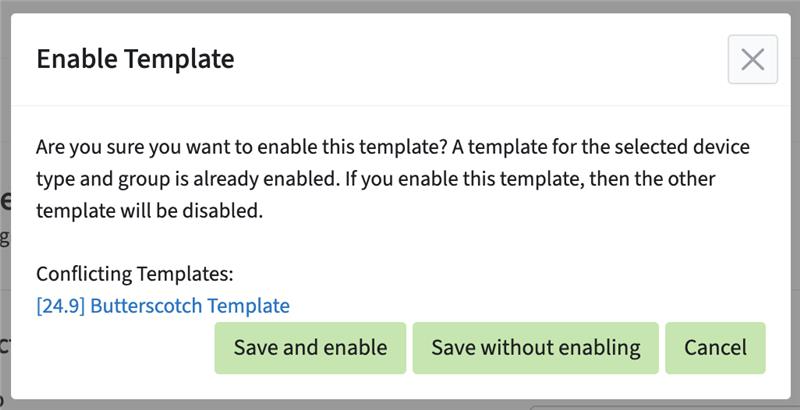 You will be prompted in the wizard when you click the Save & Close button.
 -
You can choose to:
-
Enable the new template (and replace the existing one).
-
Save the new template without enabling it.
-
Cancel the action.
-
Example scenarios
-
Allowed: A group contains routers and gateways each model type can have its own active template.
-
Not allowed: Two templates targeting the same router model in the same group only one can be active.
Best practices
-
Use separate templates for different device models within the same group.
-
Disable old templates before enabling updated versions (for example, after firmware upgrades).
-
Verify group assignments during the Finalize & Review step to avoid conflicts.
Understanding these rules helps you structure templates and groups effectively, especially when managing mixed-device fleets or performing staged updates.