FAQs for Premier License customers
If you're a Digi Premier subscription customer, you may have seen or heard about changes coming to your Digi Premier Licenses in Digi Remote Manager.
-
Starting October 1, 2026, licenses move from counting against an account-wide device limit to being assigned directly to individual devices and device limits are going away entirely.
-
Starting November 1, 2026, devices without an assigned device management license can no longer be managed through Digi Remote Manager. Losing a license doesn't affect the device itself: it keeps running with its existing configuration, and reassigning a license later restores cloud management, support, warranty, and firmware upgrade access.
The FAQs below answer common questions about this transition.

This banner is letting you know about updates to how Digi Remote Manager handles licensing, which take effect October 1, 2026. This is pertinent only to customers that have Digi Premier subscriptions.
What's changing:
-
The licensing model is changing. Licenses are becoming something you assign directly to a device, rather than just counting against an account-wide device limit.
-
No more device limits. Device limits on Digi Remote Manager accounts are going away entirely.
-
License assignments will be done automatically on October 1. Any of your licenses that aren't already assigned to a specific device will be automatically assigned for you, based on things like how long a device has been registered and how it's used. You don't have to do anything if you're fine with that.
If you'd rather control exactly which device gets which license (for example, if you have licenses with different expiration dates), you can manually assign them yourself any time before or after Oct 1 on the Subscriptions page in Digi Remote Manager .
-
There is a grace period until November 1. If your account doesn't have enough licenses to cover every device after the October 1 auto-assignment, those extra devices enter a month-long grace period so you have time to assign licenses. On November 1, any devices without a license can no longer be accessed via Digi Remote Manager.
Note Losing a license does not, in any way, break your device or change its configuration. You lose the ability to manage it through Digi Remote Manager and you lose support, warranty, and firmware upgrade access, but the device keeps running and you can still manage it locally. Nothing gets reset or reconfigured, and reassigning a license later brings cloud management right back.
Yes. Device limits are being removed. A device without an assigned license can still be added to the account. It just won't be active or manageable until it has a license. This does not apply to Lifecycle Assurance or Digi 360 devices.
No. Existing, unassigned licenses will be auto-assigned to devices on October 1. You also have the option to manually assign or reassign licenses at any time if you want more control (for example, if they have license "buckets" with different expiration dates).
Administrators will be able to see the subscriptions for all the accounts they manage on the Subscriptions page in Digi Remote Manager.
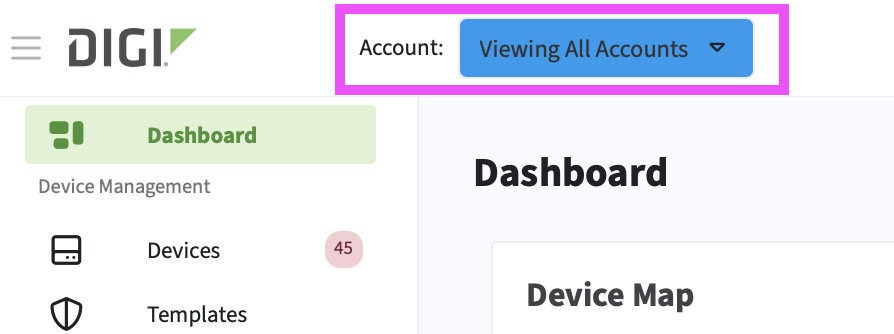
Are you getting an error when trying to access the page?

Take a look at the Accounts dropdown at the top of the page, Make sure you have All Accounts selected. You cannot view the Subscriptions page when in a sub-account.
The devices are auto assigned on October 1 and assigns available licenses to devices. Any device that doesn't get a license enters a grace period until November 1 where customers can assign licenses to these devices.
On November 1, anything still unlicensed after the grace period becomes disabled/unlicensed.
It means you have lost Digi Remote Manager cloud management access to that device. It does not mean the device stops working. You can still access and manage the device locally, and it continues operating normally. You also lose support, warranty coverage, and the ability to upgrade firmware while the device is unlicensed.
No. The device is not reconfigured or reset. You can access it locally. Once a license is assigned to the device, Digi Remote Manager cloud management resumes.
There is no reinstatement fee at this time. A device can always be renewed later; this may be revisited in the future.
October 1, 2026 is the date where licenses in your account are automatically assigned to devices. The assignment process is not random. The logic considers factors like how long a device has been registered on the account, usage frequency, and grouping (assigning by groups rather than one device at a time). It's Digi's best guess at how we think you would want these licenses assigned, but it is not guaranteed to match exactly what you would choose. Digi recommends reviewing the license assignments and making any desired changes, which you can do from the Subscriptions page in Digi Remote Manager.
Yes. Licenses are not permanently tied to a device. They can be unassigned and reassigned at any time.
There's no hard-coded limit in the system today. However, this will be monitored and the terms-of-service prohibit using constant reassignment. An example would be an account that has far more devices than licenses (for example, 1000 devices, 25 licenses) and they continuously swap licenses in and out to cover devices as needed. This is a terms-of-service violation. Normal reassignment activity, including MSPs optimizing licensing across a reasonable device pool, is not the a target of Digi monitoring.
Not yet. This is a known issue. Currently the assignment dropdown shows all licenses available on the account, even ones that aren't compatible with the selected device (assigning an incompatible license will fail). A fix is planned to filter the list to only compatible/available licenses.
No. Digi 360 licenses are model-specific. For example, an IX25 Digi 360 license can be reassigned to another IX25, but not to a different Digi 360 device model. Premier licenses won't work on Digi 360 devices, and Digi 360 licenses won't work on pre-Digi 360 devices.
No. If a child device didn't require a separate license before, it still doesn't - only the parent gateway needs to be licensed.
Active/licensed - Has an assigned license.
Grace period - License expired or unassigned starting October 1, 2026 and for a 30-day duration; device is still active.
Unlicensed/disabled - Past the grace period (or otherwise never received a license); loses cloud management, support, warranty, and firmware upgrade access.
Yes. When a device is added to the account, it automatically grabs a license if one is available.
You don't have to do anything. As long as your pool of licenses covers all of your deployed devices, the auto-assignment on October 1 (and future automatic assignment for newly added devices) handles it for you.