Use the location service feature to identify and track the location of your IX40 router using GNSS. This feature is enabled by default.
Required configuration items
-
Set the power source type for the GNSS antenna. For more information, see IX40 GNSS antenna.
To configure the location service using GNSS:
-
Choose the management interface you want to use to access your device. Click a dropdown for instructions.
-
Configure the settings.
 Menu instructions
-
Click to open the device's configuration menu.
-
In Digi Remote Manager, on the device dashboard, click Settings.
-
In the Web UI, click Device Configuration.
-
- Click Services > Location.
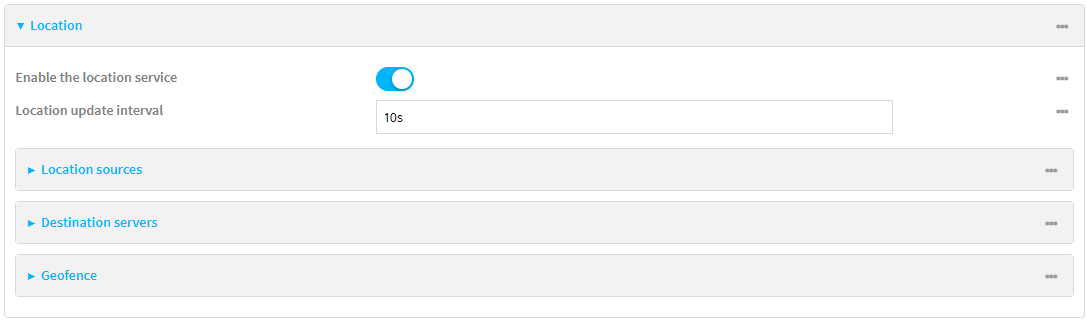
- The location service is enabled by default. To disable, toggle off Enable.
- For Location update interval, type the amount of time to wait between polling location sources for new location data. The default is ten seconds.
For example, to set Location update interval to ten minutes, enter 10m or 600s.
- For information about configuring Location sources, see the following:
- To accept location information from an external location-enabled server, see Configure the device to accept location messages from external sources.
- To set a static location for the device, see Configure the device to use a user-defined static location.
If multiple location sources are enabled at the same time, the device's location will be determined based on the order that the location sources are listed here.
- See Forward location information to a remote host for information about configuring Destination servers.
- See Configure geofencing for information about configuring Geofence.
- Click Apply to save the configuration and apply the change.
CLI instructions
-
At the CLI prompt, type config and then press Enter.
- Enable or disable the GNSS module:
- To enable the module:
(config)> service location gnss true
(config)>
- To disable the module:
(config)> service location gnss false
(config)>
- To enable the module:
- Set the amount of time that the IX40 device will wait before polling location sources for updated location data:
(config)> service location interval value
(config)>
For example, to set interval to ten minutes, enter either 10m or 600s:
(config)> service location interval 600s
(config)>
The default is 10 seconds.
- Save the configuration and apply the change.
(config)> save Configuration saved. > - Type exit to exit the Admin CLI.
Depending on your device configuration, you may be presented with an Access selection menu. Type quit to disconnect from the device.
-


