Geofencing is a mechanism to create a virtual perimeter that allows you configure your IX40 device to perform actions when entering or exiting the perimeter. For example, you can configure a device to factory default if its location service indicates that it has been moved outside of the geofence.
Multiple geofences can be defined for one device, allowing for a complex configuration in which different actions are taken depending on the physical location of the device.
Required configuration items
- Location services must be enabled.
- The geofence must be enabled.
- The boundary type of the geofence, either circular or polygonal.
- If boundary type is circular, the latitude and longitude of the center point of the circle, and the radius.
- If boundary type is polygonal, the latitude and longitude of the polygon's vertices (a vertex is the point at which two sides of a polygon meet). Three vertices will create a triangular polygon; four will create a square, etc. Complex polygons can be defined.
- Actions that will be taken when the device's location triggers a geofence event. You can define actions for two types of events:
- Actions taken when the device enters the boundary of the geofence, or is inside the boundary when the device boots.
- Actions taken when the device exits the boundary of the geofence, or is outside the boundary when the device boots.
For each event type:
Determine if the action(s) associated with the event type should be performed when the device boots inside or outside of the geofence boundary.
The number of update intervals that should take place before the action(s) are taken.
Multiple actions can be configured for each type of event. For each action:
The type of action, either a factory erase or executing a custom script.
If a custom script is used:
The script that will be executed.
Whether to log output and errors from the script.
The maximum memory that the script will have available.
Whether the script should be executed within a sandbox that will prevent the script from affecting the system itself.
Additional configuration items
- Update interval, which determines the amount of time that the geofence should wait between polling for updated location data.
-
Choose the management interface you want to use to access your device. Click a dropdown for instructions.
-
Configure the settings.
 Menu instructions
-
Click to open the device's configuration menu.
-
In Digi Remote Manager, on the device dashboard, click Settings.
-
In the Web UI, click Device Configuration.
-
- Click Services > Location > Geofence.
- For Add Geofence, type a name for the geofence and click .
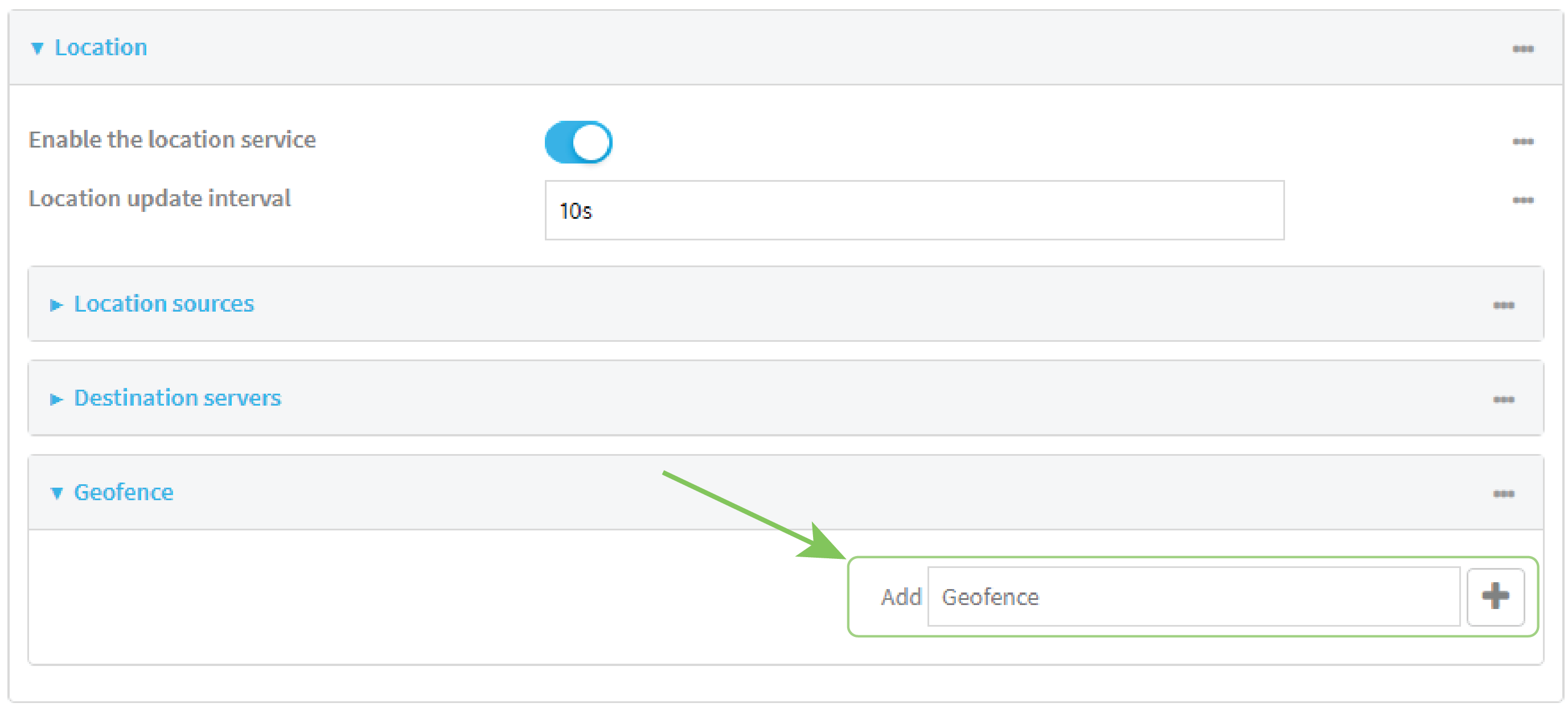
The geofence is enabled by default. To disable, toggle off Enable.
- For Update interval, type the amount of time that the geofence should wait between polling for updated location data. The default is one minute.
For example, to set Update interval to ten minutes, enter 10m or 600s.
- For Boundary type, select the type of boundary that the geofence will have.
- If Circular is selected:
- Click to expand Center.
- Type the Latitude and Longitude of the center point of the circle. Allowed values are:
For Latitude, any integer between -90 and 90, with up to six decimal places.
For Longitude, any integer between -180 and 180, with up to six decimal places.
- For Radius, type the radius of the circle. Allowed values are an integer followed by m or km, for example, 100m or 1km.
- If Polygonal is selected:
- Click to expand Coordinates.
- Click to add a point that represents a vertex of the polygon. A vertex is the point at which two sides of a polygon meet.
- Type the Latitude and Longitude of one of the vertices of the polygon. Allowed values are:
For Latitude, any integer between -90 and 90, with up to six decimal places.
For Longitude, any integer between -180 and 180, with up to six decimal places.
- Click again to add an additional point, and continue adding points to create the desired polygon.
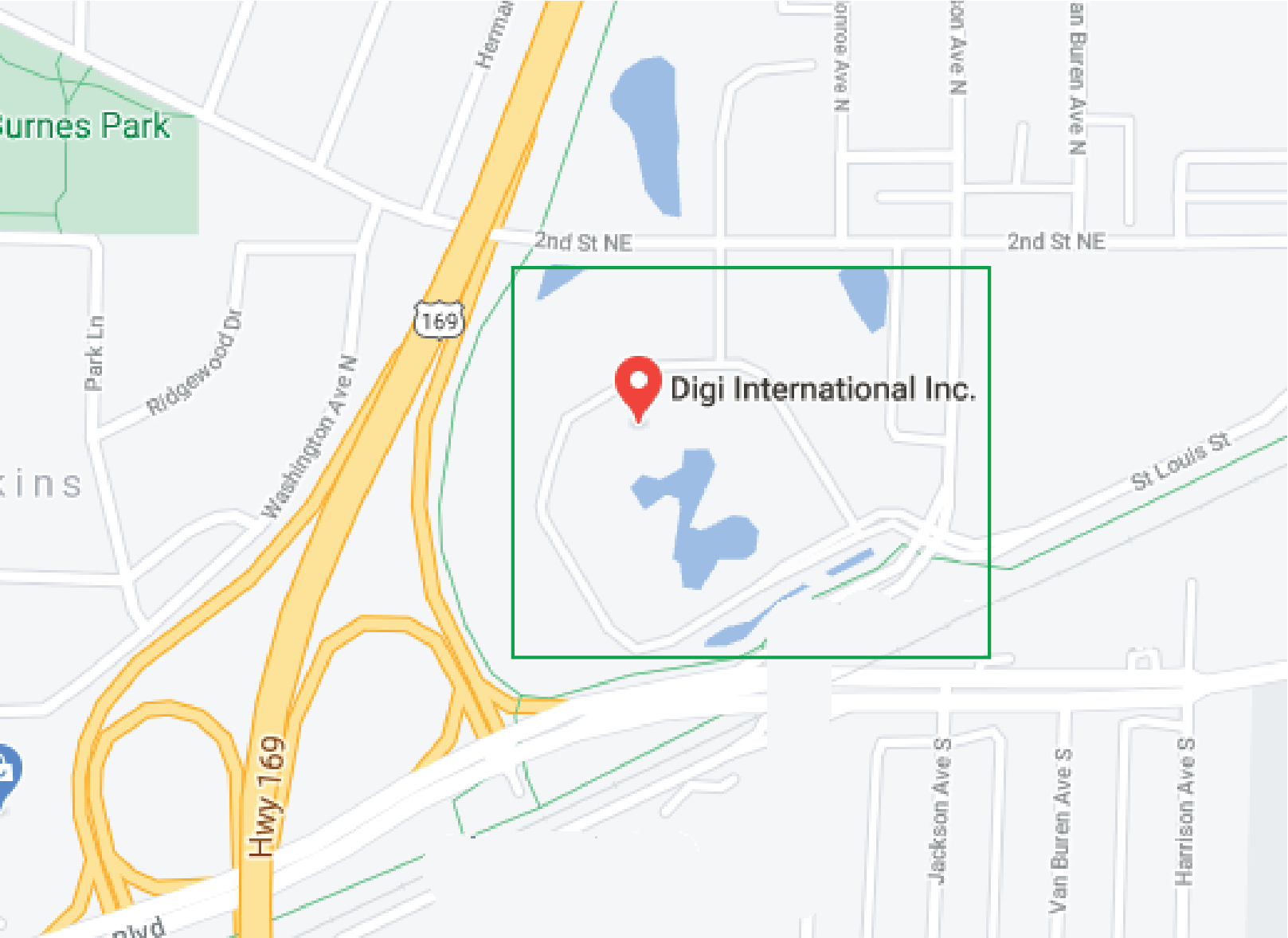
For example, to configure a square polygon around the Digi headquarters, configure a polygon with four points: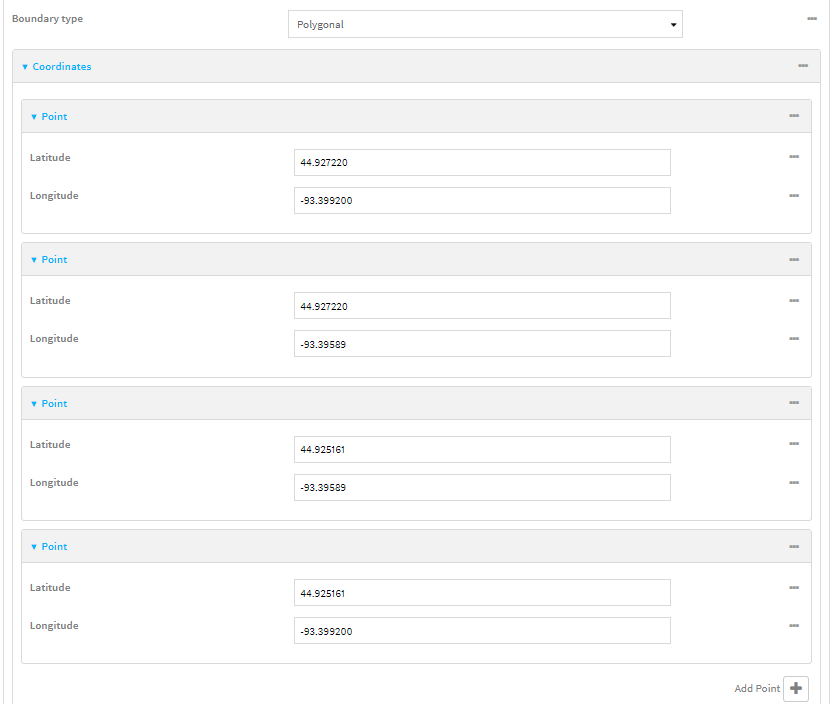
This defines a square-shaped polygon equivalent to the following:
- If Circular is selected:
- Define actions to be taken when the device's location triggers a geofence event:
- To define actions that will be taken when the device enters the geofence, or is inside the geofence when it boots:
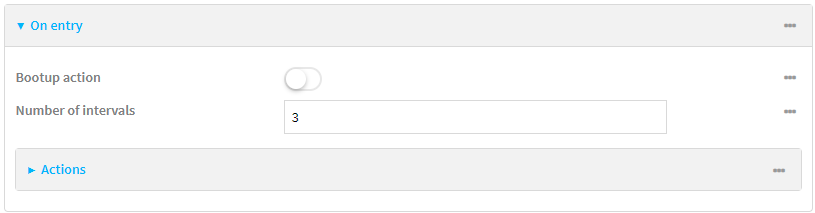
Click to expand On entry.
(Optional) Enable Bootup action to configure the device to perform the On entry actions if the device is inside the geofence when it boots.
For Number of intervals, type or select the number of Update Intervals that must take place prior to performing the On entry actions.
For example, if the Update interval is 1m (one minute) and the Number of intervals is 3, the On entry actions will not be performed until the device has been inside the geofence for three minutes.
Click to expand Actions.
Click to create a new action.
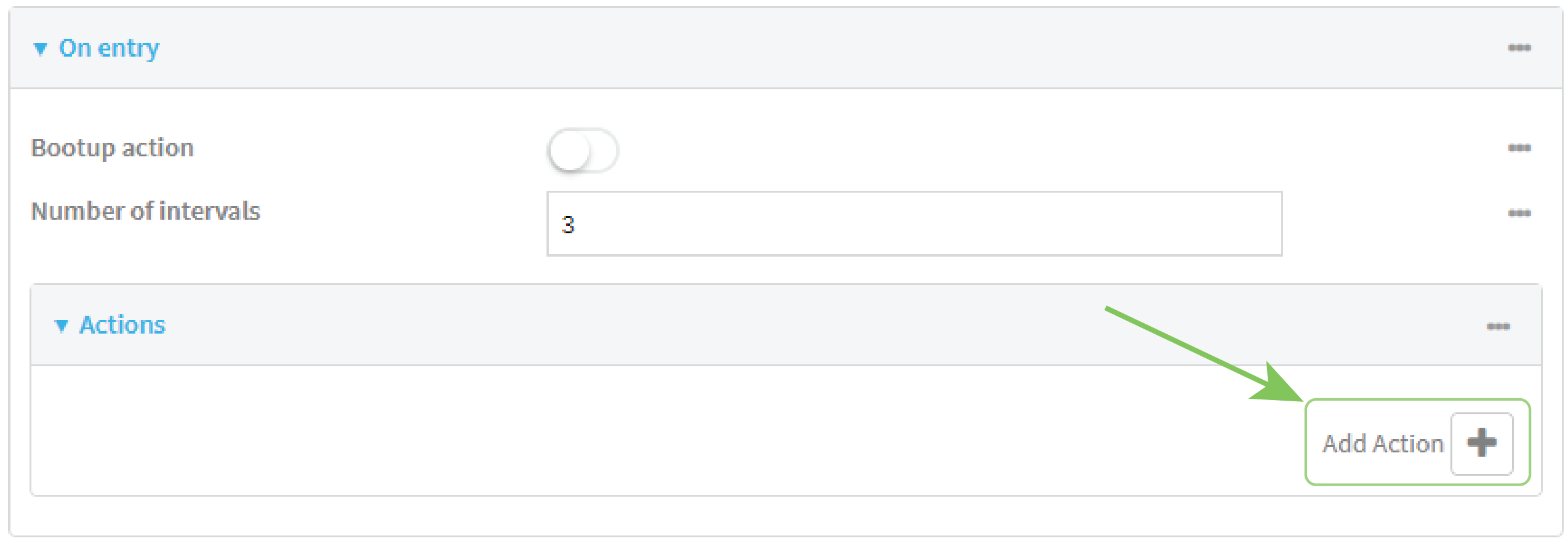
For Action type, select either:
Factory erase to erase the device configuration when the action is triggered.
Custom script to execute a custom script when the action is triggered.
If Custom script is selected:Click to expand Custom script.
For Commands, type the script that will be executed when the action is triggered. If the script begins with #!, then the proceeding file path will be used to invoke the script interpreter. If not, then the default shell will be used.
Enable Log script output to log the output of the script to the system log.
Enable Log script errors to log errors from the script to the system log.
(Optional) For Maximum memory, type the maximum amount of system memory that will be available for the script and it spawned processes.
Allowed values are any integer followed by one of the following: b|bytes|KB|k|MB|M|GB|G|TB|T.
For example. the allocate one megabyte of memory to the script and its spawned processes, type 1MB or 1M.
Sandbox is enabled by default. This prevents the script from adversely affecting the system. If you disable Sandbox, the script may render the system unusable.
Repeat for any additional actions.
- To define actions that will be taken when the device exits the geofence, or is outside the geofence when it boots:
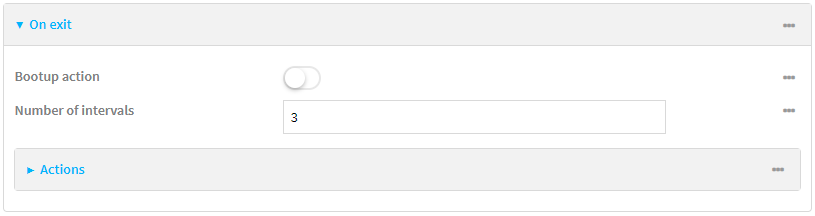
Click to expand On exit.
(Optional) Enable Bootup action to configure the device to perform the On exit actions if the device is inside the geofence when it boots.
For Number of intervals, type or select the number of Update Intervals that must take place prior to performing the On exit actions.
For example, if the Update interval is 1m (one minute) and the Number of intervals is 3, the On entry actions will not be performed until the device has been inside the geofence for three minutes.
Click to expand Actions.
Click to create a new action.
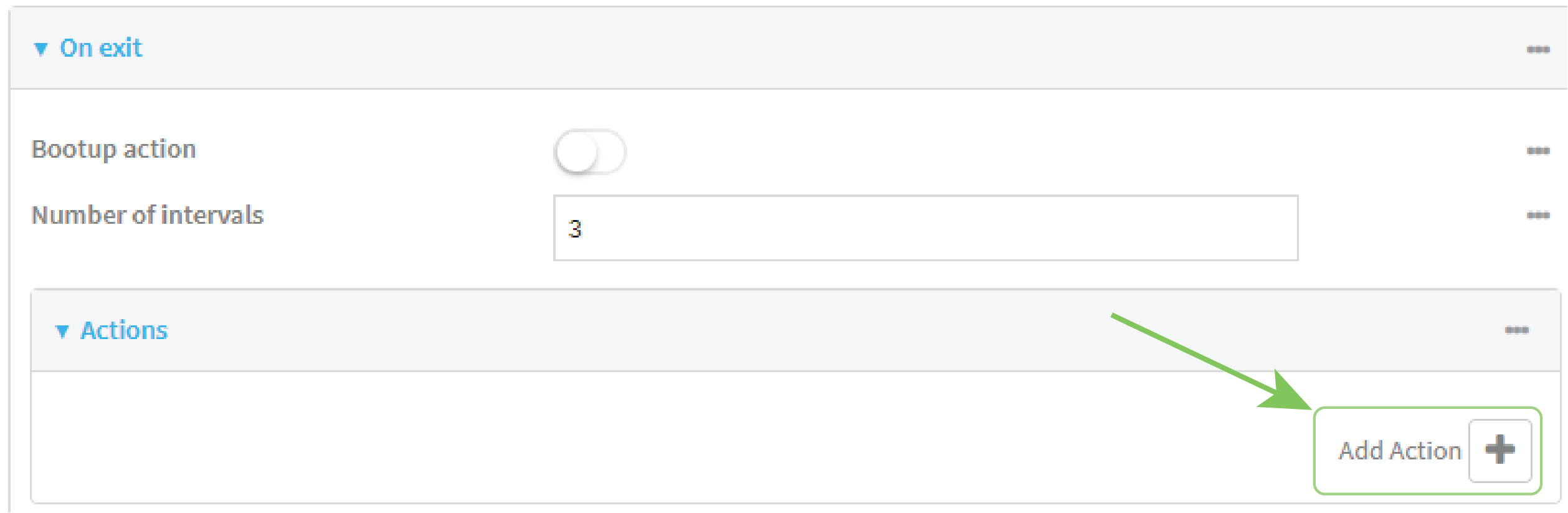
For Action type, select either:
Factory erase to erase the device configuration when the action is triggered.
Custom script to execute a custom script when the action is triggered.
If Custom script is selected:Click to expand Custom script.
For Commands, type the script that will be executed when the action is triggered. If the script begins with #!, then the proceeding file path will be used to invoke the script interpreter. If not, then the default shell will be used.
Enable Log script output to log the output of the script to the system log.
Enable Log script errors to log errors from the script to the system log.
(Optional) For Maximum memory, type the maximum amount of system memory that will be available for the script and it spawned processes.
Allowed values are any integer followed by one of the following: b|bytes|KB|k|MB|M|GB|G|TB|T.
For example. the allocate one megabyte of memory to the script and its spawned processes, type 1MB or 1M.
Sandbox is enabled by default. This prevents the script from adversely affecting the system. If you disable Sandbox, the script may render the system unusable.
Repeat for any additional actions.
- Click Apply to save the configuration and apply the change.
CLI instructions
-
At the CLI prompt, type config and then press Enter.
- Add a geofence:
(config)> add service location geofence name
(config service location geofence name)>
where name is a name for the geofence. For example:
(config)> add service location geofence test_geofence
(config service location geofence test_geofence)>
The geofence is enabled by default. To disable:
(config service location geofence test_geofence)> enable false
(config service location geofence test_geofence)>
- Set the amount of time that the geofence should wait between polling for updated location data:
(config service location geofence test_geofence)> update_interval value
(config service location geofence test_geofence)>
For example, to set update_interval to ten minutes, enter either 10m or 600s:
(config service location geofence test_geofence)> update_interval 600s
(config service location geofence test_geofence)>
The default is 1m (one minute).
- Set the boundary type for the geofence:
(config service location geofence test_geofence)> boundary value
(config service location geofence test_geofence)>
where value is either circular or polygonal.
If boundary is set to circular :
Set the latitude and longitude of the center point of the circle:
(config service location geofence test_geofence)> center latitude int
(config service location geofence test_geofence)> center longitude int
(config service location geofence test_geofence)>
where int is:
For latitude, any integer between -90 and 90, with up to six decimal places.
For longitude, any integer between -180 and 180, with up to six decimal places.
Set the radius of the circle:
(config service location geofence test_geofence)> radius radius
(config service location geofence test_geofence)>
where radius is an integer followed by m or km, for example, 100m or 1km.
If boundary is set to polygonal:
- Set the coordinates of one vertex of the polygon. A vertex is the point at which two sides of a polygon meet.
- Add a vertex:
(config service location geofence test_geofence)> add coordinates end
(config service location geofence test_geofence coordinates 0)>
Set the latitude and longitude of the vertex:
(config service location geofence test_geofence coordinates 0)> latitude int
(config service location geofence test_geofence coordinates 0)> longitude int
(config service location geofence test_geofence coordinates 0)>
where int is:
For latitude, any integer between -90 and 90, with up to six decimal places.
For longitude, any integer between -180 and 180, with up to six decimal places.
- Configure additional vortices:
(config service location geofence test_geofence coordinates 0)> ..
(config service location geofence test_geofence coordinates)> add end
(config service location geofence test_geofence coordinates 1)> latitude int
(config service location geofence test_geofence coordinates 1)> longitude int
(config service location geofence test_geofence coordinates 1)>
where int is:
For latitude, any integer between -90 and 90, with up to six decimal places.
For longitude, any integer between -180 and 180, with up to six decimal places.
Repeat for each vortex of the polygon.
For example, to configure a square polygon around the Digi headquarters, configure a polygon with four points:(config service location geofence test_geofence)> add coordinates end (config service location geofence test_geofence coordinates 0)> latitude 44.927220 (config service location geofence test_geofence coordinates 0)> longitude -93.399200 (config service location geofence test_geofence coordinates 0)> .. (config service location geofence test_geofence coordinates)> add end (config service location geofence test_geofence coordinates 1)> latitude 44.927220 (config service location geofence test_geofence coordinates 1)> longitude -93.39589 (config service location geofence test_geofence coordinates 1)> .. (config service location geofence test_geofence coordinates)> add end (config service location geofence test_geofence coordinates 2)> latitude 44.925161 (config service location geofence test_geofence coordinates 2)> longitude -93.39589 (config service location geofence test_geofence coordinates 2)> .. (config service location geofence test_geofence coordinates)> add end (config service location geofence test_geofence coordinates 3)> latitude 44.925161 (config service location geofence test_geofence coordinates 3)> longitude -93.399200 (config service location geofence test_geofence coordinates 3)>
This defines a square-shaped polygon equivalent to the following:
- Add a vertex:
- Set the coordinates of one vertex of the polygon. A vertex is the point at which two sides of a polygon meet.
- Define actions to be taken when the device's location triggers a geofence event:
- To define actions that will be taken when the device enters the geofence, or is inside the geofence when it boots:
(Optional) Configure the device to preform the actions if the device is inside the geofence when it boots:
(config)> service location geofence test_geofence on_entry bootup true
(config)>
Set the number of update_intervals that must take place prior to performing the actions:
(config)> service location geofence test_geofence on_entry num_intervals int
(config)>
For example, if the update interval is 1m (one minute) and the num_intervals is set to 3, the actions will not be performed until the device has been inside the geofence for three minutes.
Add an action:
Type ... to return to the root of the configuration:
(config service location geofence test_geofence coordinates 3)> ...
(config)>
Add the action:
(config)> add service location geofence test_geofence on_entry action end
(config service location geofence test_geofence on_entry action 0)>
Set the type of action:
(config service location geofence test_geofence on_entry action 0)> type value
(config service location geofence test_geofence on_entry action 0)>
where value is either:
factory_erase—Erases the device configuration when the action is triggered.
script—Executes a custom script when the action is triggered.
factory_erase or script.
If type is set to script:Type or paste the script, closed in quote marks:
(config service location geofence test_geofence on_entry action 0)> commands "script"
(config service location geofence test_geofence on_entry action 0)>
If the script begins with #!, then the proceeding file path will be used to invoke the script interpreter. If not, then the default shell will be used.
To log the output of the script to the system log:
(config service location geofence test_geofence on_entry action 0)> syslog_stdout true
(config service location geofence test_geofence on_entry action 0)>
To log the errors from the script to the system log:
(config service location geofence test_geofence on_entry action 0)> syslog_stderr true
(config service location geofence test_geofence on_entry action 0)>
(Optional) Set the maximum amount of system memory that will be available for the script and it spawned processes:
(config service location geofence test_geofence on_entry action 0)> max_memory value
(config service location geofence test_geofence on_entry action 0)>
where value is any integer followed by one of the following: b|bytes|KB|k|MB|M|GB|G|TB|T.
For example. the allocate one megabyte of memory to the script and its spawned processes:
(config service location geofence test_geofence on_entry action 0)> max_memory 1MB
(config service location geofence test_geofence on_entry action 0)>
A sandbox is enabled by default to prevent the script from adversely affecting the system. To disable the sandbox:
(config service location geofence test_geofence on_entry action 0)> sandbox false
(config service location geofence test_geofence on_entry action 0)>
If you disable the sandbox, the script may render the system unusable.
Repeat for any additional actions.
- To define actions that will be taken when the device exits the geofence, or is outside the geofence when it boots:
(Optional) Configure the device to preform the actions if the device is outside the geofence when it boots:
(config)> service location geofence test_geofence on_exit bootup true
(config)>
Set the number of update_intervals that must take place prior to performing the actions:
(config)> service location geofence test_geofence on_exit num_intervals int
(config)>
For example, if the update interval is 1m (one minute) and the num_intervals is set to 3, the actions will not be performed until the device has been outside the geofence for three minutes.
Add an action:
Type ... to return to the root of the configuration:
(config service location geofence test_geofence coordinates 3)> ...
(config)>
Add the action:
(config)> add service location geofence test_geofence on_exit action end
(config service location geofence test_geofence on_exit action 0)>
Set the type of action:
(config service location geofence test_geofence on_exit action 0)> type value
(config service location geofence test_geofence on_exit action 0)>
where value is either:
factory_erase—Erases the device configuration when the action is triggered.
script—Executes a custom script when the action is triggered.
factory_erase or script.
If type is set to script:Type or paste the script, closed in quote marks:
(config service location geofence test_geofence on_exit action 0)> commands "script"
(config service location geofence test_geofence on_exit action 0)>
If the script begins with #!, then the proceeding file path will be used to invoke the script interpreter. If not, then the default shell will be used.
To log the output of the script to the system log:
(config service location geofence test_geofence on_exit action 0)> syslog_stdout true
(config service location geofence test_geofence on_exit action 0)>
To log the errors from the script to the system log:
(config service location geofence test_geofence on_exit action 0)> syslog_stderr true
(config service location geofence test_geofence on_exit action 0)>
(Optional) Set the maximum amount of system memory that will be available for the script and it spawned processes:
(config service location geofence test_geofence on_exit action 0)> max_memory value
(config service location geofence test_geofence on_exit action 0)>
where value is any integer followed by one of the following: b|bytes|KB|k|MB|M|GB|G|TB|T.
For example. the allocate one megabyte of memory to the script and its spawned processes:
(config service location geofence test_geofence on_exit action 0)> max_memory 1MB
(config service location geofence test_geofence on_exit action 0)>
A sandbox is enabled by default to prevent the script from adversely affecting the system. To disable the sandbox:
(config service location geofence test_geofence on_exit action 0)> sandbox false
(config service location geofence test_geofence on_exit action 0)>
If you disable the sandbox, the script may render the system unusable.
Repeat for any additional actions.
- Save the configuration and apply the change.
(config)> save Configuration saved. > - Type exit to exit the Admin CLI.
Depending on your device configuration, you may be presented with an Access selection menu. Type quit to disconnect from the device.
-


