You can configure an IPsec tunnel with a remote device.
Required configuration items
- IPsec tunnel configuration items:
- A name for the tunnel.
Note If the tunnel name is more than eight characters, the name will be truncated in the underlying network interface to the first six characters followed by three digits, incrementing from 000. This affects any custom scripts or firewall rules that may be trying to adjust the
- The mode: either tunnel or transport.
- Enable the IPsec tunnel.
The IPsec tunnel is enabled by default.
- The firewall zone of the IPsec tunnel.
- The routing metric for routes associated with this IPsec tunnel.
- The authentication type and pre-shared key or other applicable keys and certificates.
If SCEP certificates will be selected as the Authentication type, create the SCEP client prior to configuring the IPsec tunnel. See Configure a Simple Certificate Enrollment Protocol client for instructions.
- The local endpoint type and ID values, and the remote endpoint host and ID values.
- A name for the tunnel.
- IKE configuration items
- The IKE version, either IKEv1 or IKEv2.
- Whether to initiate a key exchange or wait for an incoming request.
- The IKE mode, either main aggressive.
- The IKE authentication protocol to use for the IPsec tunnel negotiation during phase 1 and phase 2.
- The IKE encryption protocol to use for the IPsec tunnel negotiation during phase 1 and phase 2.
- The IKE Diffie-Hellman group to use for the IPsec tunnel negotiation during phase 1 and phase 2.
- Enable dead peer detection and configure the delay and timeout.
- Destination networks that require source NAT.
- Active recovery configuration. See Configure SureLink active recovery for IPsec for information about IPsec active recovery.
Additional configuration items
The following additional configuration settings are not typically configured to get an IPsec tunnel working, but can be configured as needed:
- Determine whether the device should use UDP encapsulation even when it does not detect that NAT is being used.
- If using IPsec failover, identify the primary tunnel during configuration of the backup tunnel.
- The Network Address Translation (NAT) keep alive time.
- The protocol, either Encapsulating Security Payload (ESP) or Authentication Header (AH).
- The management priority for the IPsec tunnel interface. The active interface with the highest management priority will have its address reported as the preferred contact address for central management and direct device access.
- Enable XAUTH client authentication, and the username and password to be used to authenticate with the remote peer.
- Enable Mode-configuration (MODECFG) to receive configuration information, such as the private IP address, from the remote peer.
- Disable the padding of IKE packets. This should normally not be done except for compatibility purposes.
- Destination networks that require source NAT.
- Depending on your network and firewall configuration, you may need to add a packet filtering rule to allow incoming IPsec traffic.
- Tunnel and key renegotiating
- The lifetime of the IPsec tunnel before it is renegotiated.
- The amount of time before the IKE phase 1 lifetime expires.
- The amount of time before the IKE phase 2 lifetime expires
- The lifetime margin, a randomizing amount of time before the IPsec tunnel is renegotiated.
Note If the remote networks for an IPsec tunnel overlap with the networks for a
To configure an IPsec tunnel:
-
Choose the management interface you want to use to access your device. Click a dropdown for instructions.
-
Configure the settings.
 Menu instructions
-
Click to open the device's configuration menu.
-
In Digi Remote Manager, on the device dashboard, click Settings.
-
In the Web UI, click Device Configuration.
-
- Click VPN > IPsec.
- Click to expand Tunnels.
- For Add IPsec tunnel, type a name for the tunnel and click .
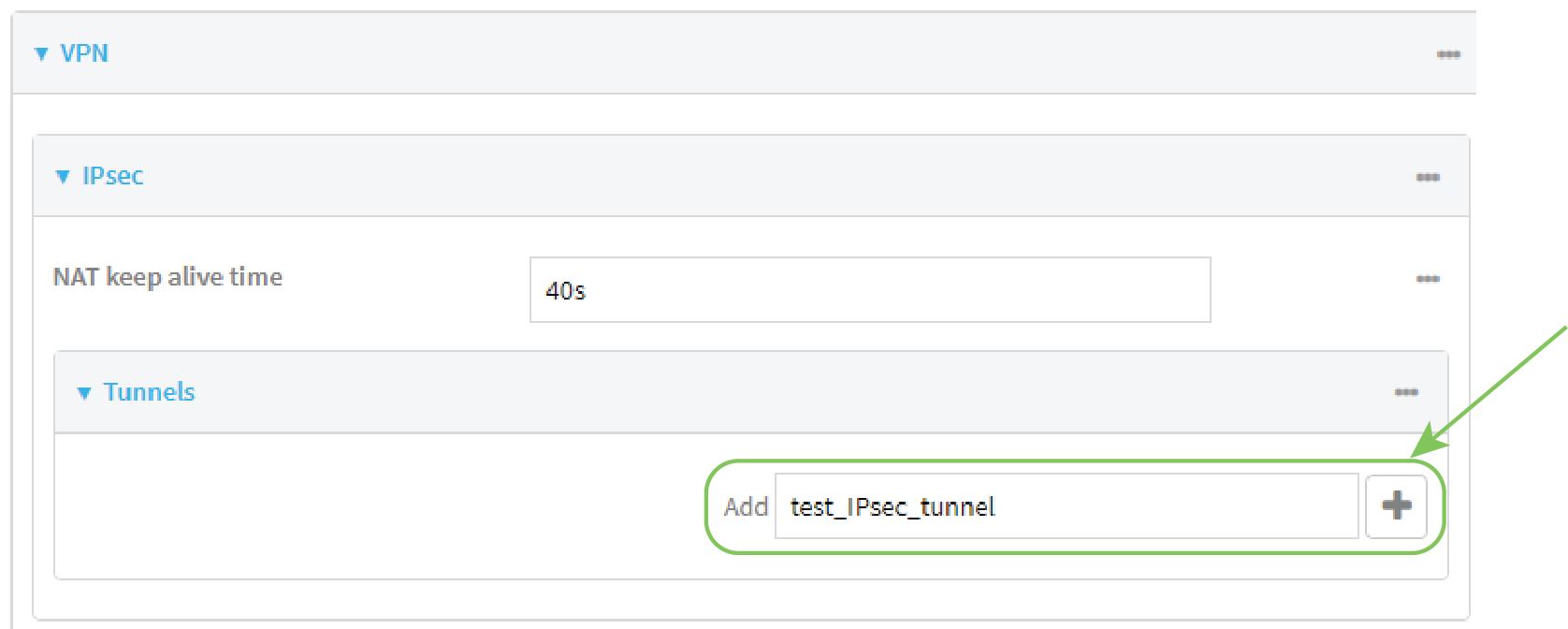
The new IPsec tunnel configuration is displayed.
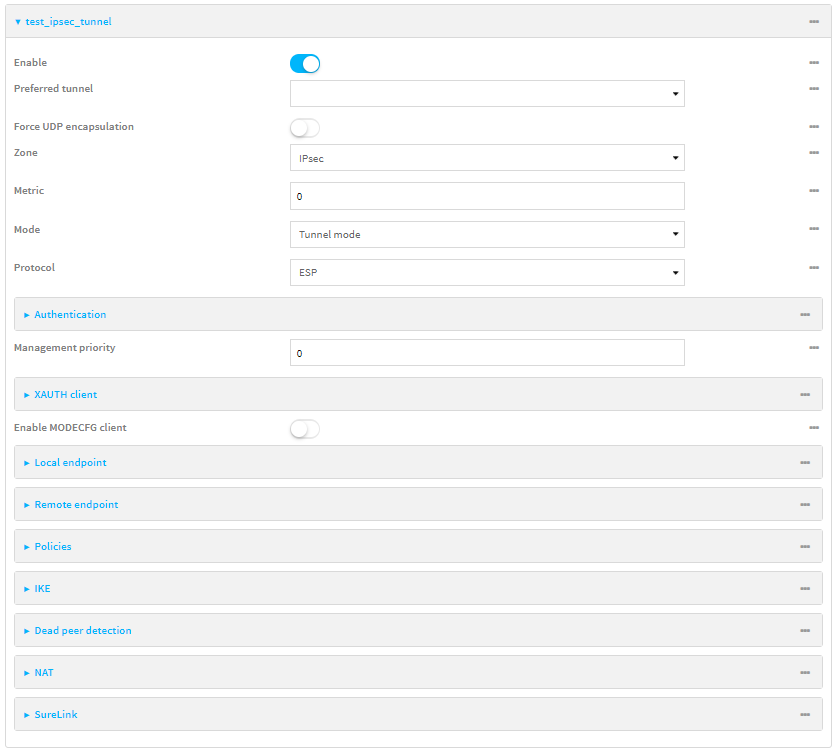
- The IPsec tunnel is enabled by default. To disable, toggle off Enable.
- (Optional) Preferred tunnel provides an optional mechanism for IPsec failover behavior. See Configure IPsec failover for more information.
- (Optional) Enable Force UDP encapsulation to force the tunnel to use UDP encapsulation even when it does not detect that NAT is being used.
- For Zone, select the firewall zone for the IPsec tunnel. Generally this should be left at the default of IPsec.
- Click to expand Firewall > Packet filtering.
- For Add packet filter, click .
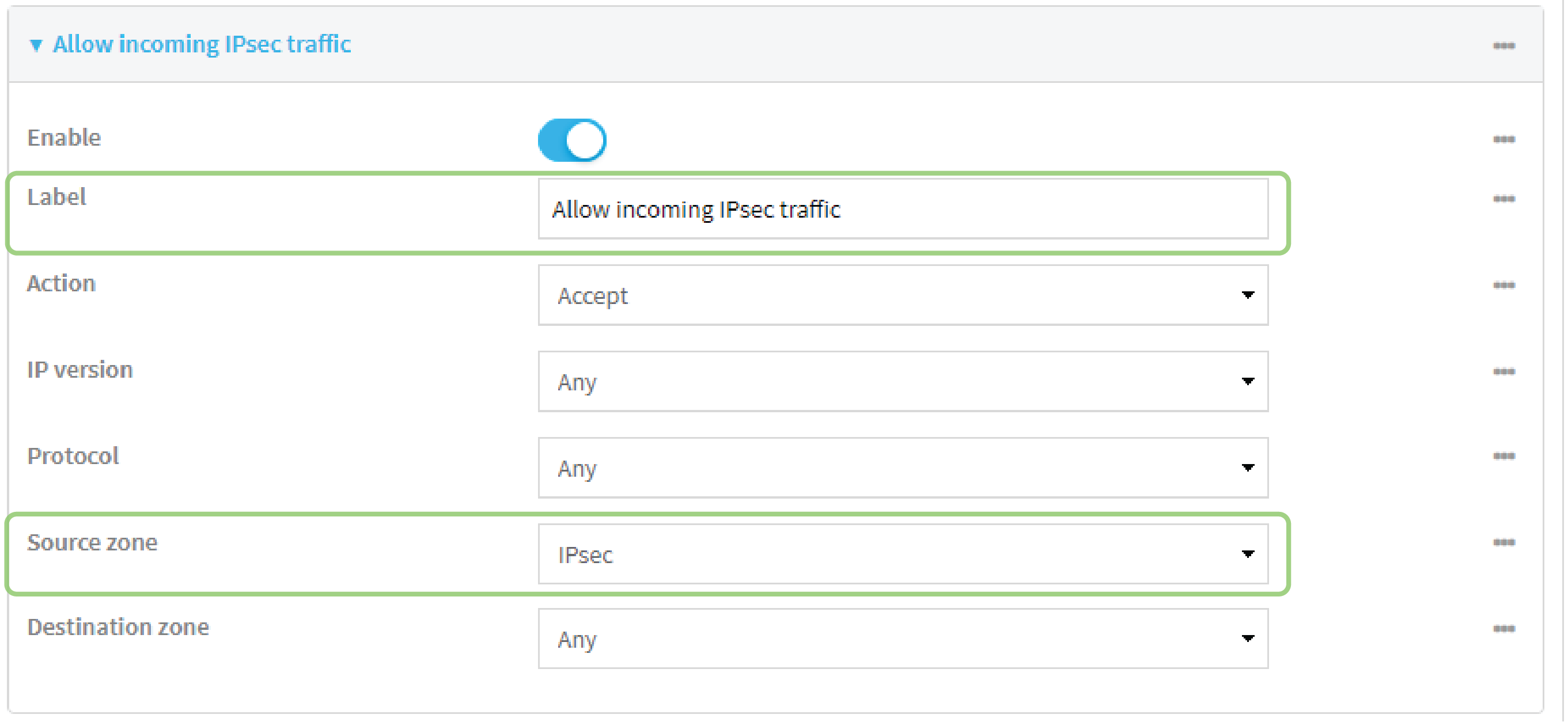
- For Label, type Allow incoming IPsec traffic.
- For Source zone, select IPsec.
Leave all other fields at their default settings.
- For Metric, enter or select the priority of routes associated with this IPsec tunnel. When more than one active route matches a destination, the route with the lowest metric is used.
The metric can also be used in tandem with SureLink to configure IPsec failover behavior. See Configure IPsec failover for more information.
- For Mode, select Tunnel mode. Transport mode is not currently supported.
- Select the Mode, either:
- Tunnel mode: The entire IP packet is encrypted and/or authenticated and then encapsulated as the payload in a new IP packet.
- Transport mode: Only the payload of the IP packet is encrypted and/or authenticated. The IP header is unencrypted.
- Select the Protocol, either:
- ESP (Encapsulating Security Payload): Provides encryption as well as authentication and integrity.
- AH (Authentication Header): Provides authentication and integrity only.
- Strict routing is disabled by default. Toggle on to enable.
Strict routing makes IPsec behave like a policy-based VPN, rather than a route-based VPN.
- Click to expand Authentication.
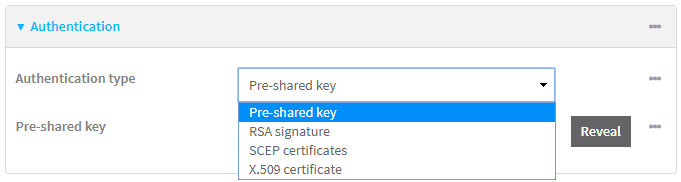
- For Authentication type, select one of the following:
- Pre-shared key: Uses a pre-shared key (PSK) to authenticate with the remote peer.
- Type the Pre-shared key.
- Asymmetric pre-shared keys: Uses asymmetric pre-shared keys to authenticate with the remote peer.
- For Local key, type the local pre-shared key. This must be the same as the remote key on the remote host.
- For Remote key, type the remote pre-shared key. This must be the same as the local key on the remote host.
- RSA signature: Uses a private RSA key to authenticate with the remote peer.
- For Private key, paste the device's private RSA key in PEM format.
- Type the Private key passphrase that is used to decrypt the private key. Leave blank if the private key is not encrypted.
- For Peer public key, paste the peer's public RSA key in PEM format.
- SCEP certificates: Uses Simple Certificate Enrollment Protocol (SCEP) to download a private key, certificates, and an optional Certificate Revocation List (CRL) to the IX20 device from a SCEP server.
You must create the SCEP client prior to configuring the IPsec tunnel. See Configure a Simple Certificate Enrollment Protocol client for instructions.
- For SCEP Client, select the SCEP client.
- X.509 certificate: Uses private key and X.509 certificates to authenticate with the remote peer.
- For Private key, paste the device's private RSA key in PEM format.
- Type the Private key passphrase that is used to decrypt the private key. Leave blank if the private key is not encrypted.
- For Certificate, paste the local X.509 certificate in PEM format.
- For Peer verification, select either:
- Peer certificate: For Peer certificate, paste the peer's X.509 certificate in PEM format.
Certificate Authority: For Certificate Authority chain, paste the Certificate Authority (CA) certificates. These must include all peer certificates in the chain up to the root CA certificate, in PEM format.
- Pre-shared key: Uses a pre-shared key (PSK) to authenticate with the remote peer.
- For Authentication type, select one of the following:
- (Optional) For Management Priority, set the management priority for this IPsec tunnel. A tunnel that is up and has the highest priority will be used for central management and direct device access.
- (Optional) To configure the device to connect to its remote peer as an XAUTH client:
- Click to expand XAUTH client.
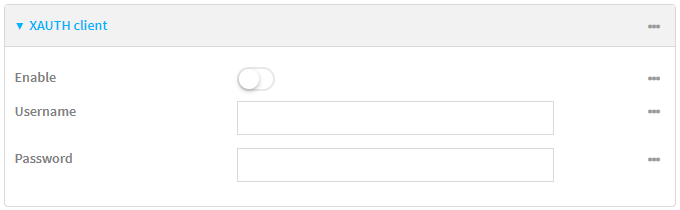
- Click Enable.
- Type the Username and Password that the device will use to authenticate as an XAUTH client with the peer.
- Click to expand XAUTH client.
- (Optional) Click Enable MODECFG client to receive configuration information, such as the private IP address, from the remote peer.
- Click to expand Local endpoint.
- For Type, select either:
- Default route: Uses the same network interface as the default route.
- Interface: Select the Interface to be used as the local endpoint.
- Click to expand ID.
- Select the ID type:
- Auto: The ID will be automatically determined from the value of the tunnels endpoints.
- Raw: Enter an ID and have it passed unmodified to the underlying IPsec stack.
For Raw ID value, type the ID that will be passed.
- Any: Any ID will be accepted.
- IPv4: The ID will be interpreted as an IP address and sent as an ID_IPV4_ADDR IKE identity.
For IPv4 ID value, type an IPv4 formatted ID. This can be a fully-qualified domain name or an IPv4 address.
- IPv6: The ID will be interpreted as an IP address and sent as an ID_IPV6_ADDR IKE identity.
For IPv6 ID value, type an IPv6 formatted ID. This can be a fully-qualified domain name or an IPv6 address.
- RFC822/Email: The ID will be interpreted as an RFC822 (email address).
For RFC822 ID value, type the ID in internet email address format.
- FQDN: The ID will be interpreted as FQDN (Fully Qualified Domain Name) and sent as an ID_FQDN IKE identity.
For FQDN ID value, type the ID as an FQDN.
- KeyID: The ID will be interpreted as a Key ID and sent as an ID_KEY_ID IKE identity.
For KEYID ID value, type the key ID.
MAC address: The device's primary MAC address will be used as the ID and sent as a ID_KEY_ID IKE identity.
Serial number: The device's serial number will be used as the ID and sent as a ID_KEY_ID IKE identity.
- Select the ID type:
- For Type, select either:
- Click to expand Remote endpoint.
For IP version, select either IPv4 or IPv6.
- For
Round robin: Attempts to connect to
Random: Randomly selects an IPsec peer to connect to from the
Priority ordered: Selects the first
Click to expand
- Click to
- For Hostname, type a hostname or IPv4 address. If your device is not configured to initiate the IPsec connection (see IKE > Initiate connection), you can also use the keyword any, which means that the hostname is dynamic or unknown.
- Click again to add additional
- Click to
- Click to expand ID.
- Select the ID type:
- Auto: The ID will be automatically determined from the value of the tunnels endpoints.
- Raw: Enter an ID and have it passed unmodified to the underlying IPsec stack.
For Raw ID value, type the ID that will be passed.
- Any: Any ID will be accepted.
- IPv4: The ID will be interpreted as an IPv4 address and sent as an ID_IPV4_ADDR IKE identity.
For IPv4 ID value, type an IPv4 formatted ID. This can be a fully-qualified domain name or an IPv4 address.
- IPv6: The ID will be interpreted as an IPv6 address and sent as an ID_IPV6_ADDR IKE identity.
For IPv6 ID value, type an IPv6 formatted ID. This can be a fully-qualified domain name or an IPv6 address.
- RFC822/Email: The ID will be interpreted as an RFC822 (email address).
For RFC822 ID value, type the ID in internet email address format.
- FQDN: The ID will be interpreted as FQDN (Fully Qualified Domain Name) and sent as an ID_FQDN IKE identity.
For FQDN ID value, type the ID as an FQDN.
- KeyID: The ID will be interpreted as a Key ID and sent as an ID_KEY_ID IKE identity.
For KEYID ID value, type the key ID.
- MAC address: The device's primary MAC address will be used as the ID and sent as a ID_KEY_ID IKE identity.
Serial number: The device's serial number will be used as the ID and sent as a ID_KEY_ID IKE identity.
- Select the ID type:
- Click to expand Policies.
Policies define the network traffic that will be encapsulated by this tunnel.
- Click to create a new policy.

The new policy configuration is displayed.
- Click to expand Local traffic selector.
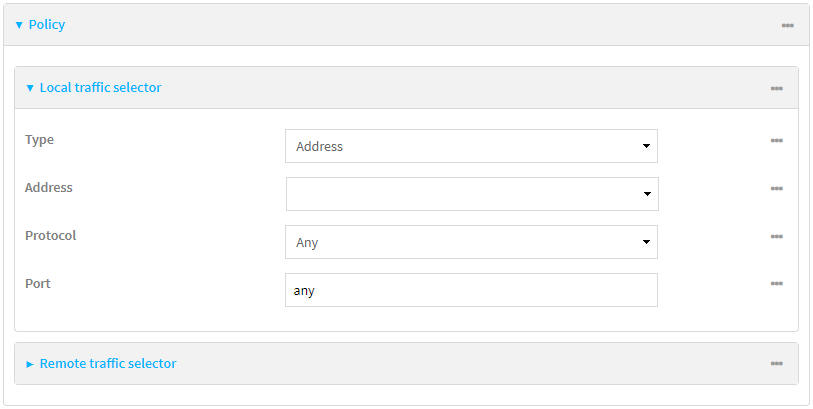
- For Type, select one of the following:
- Address: The address of a local network interface.
For Address, select the appropriate interface.
- Network: The subnet of a local network interface.
For Address, select the appropriate interface.
- Custom network: A user-defined network.
For Custom network, enter the IPv4 address and optional netmask.
- Request a network: Requests a network from the remote peer.
- Dynamic: Uses the address of the local endpoint.
- Address: The address of a local network interface.
- For Protocol, select one of the following:
- Any: Matches any protocol.
- TCP: Matches TCP protocol only.
- UDP: Matches UDP protocol only.
- ICMP: Matches ICMP requests only.
- Other protocol: Matches an unlisted protocol.
If Other protocol is selected, type the number of the protocol.
- For Port, type the port matching criteria.
Allowed values are a port number, a range of port numbers, or any.
- (Optional) Click to expand Remote traffic selector.
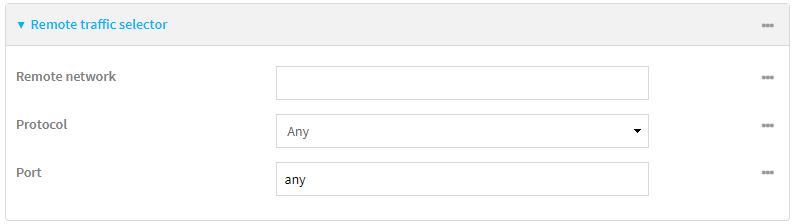
- For Remote network, enter the IP address and optional netmask of the remote network.
- For Protocol, select one of the following:
- Any: Matches any protocol.
- TCP: Matches TCP protocol only.
- UDP: Matches UDP protocol only.
- ICMP: Matches ICMP requests only.
- Other protocol: Matches an unlisted protocol.
If Other protocol is selected, type the number of the protocol.
- For Port, type the port matching criteria.
Allowed values are a port number, a range of port numbers, or any.
- Click to create a new policy.
- Click to expand IKE.
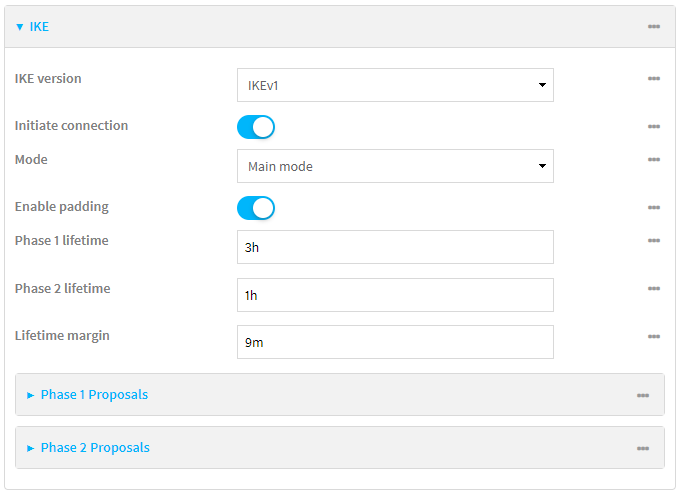
- For IKE version, select either IKEv1 or IKEv2. This setting must match the peer's IKE version.
- Initiate connection instructs the device to initiate the key exchange, rather than waiting for an incoming request.
- For Mode, select either Main mode or Aggressive mode.
- For IKE fragmentation, select one of the following:
- If supported by the peer: Send oversized IKE messages in fragments, if the peer supports receiving them.
- Always: Always send IKEv1 messages in fragments. For IKEv2, this option is equivalent to If supported by the peer.
- Never: Do not send oversized IKE messages in fragments.
- Accept: Do not send oversized IKE messages in fragments, but announce support for fragmentation to the peer.
The default is Always.
- For Enable padding, click to disable the padding of IKE packets. This should normally not be disabled except for compatibility purposes.
- For Phase 1 lifetime, enter the amount of time that the IKE security association expires after a successful negotiation and must be re-authenticated.
For example, to set Phase 1 lifetime to ten minutes, enter 10m or 600s.
- For Phase 2 lifetime, enter the amount of time that the IKE security association expires after a successful negotiation and must be rekeyed.
For example, to set Phase 2 lifetime to ten minutes, enter 10m or 600s.
- For Lifetime margin, enter a randomizing amount of time before the IPsec tunnel is renegotiated.
For example, to set Lifetime margin to ten minutes, enter 10m or 600s.
- Click to expand Phase 1 Proposals.
- Click to create a new phase 1 proposal.
- For Cipher, select the type of encryption.
- For Hash, select the type of hash to use to verify communication integrity.
- For Diffie-Hellman group, select the type of Diffie-Hellman group to use for key exchange.
- You can add additional Phase 1 proposals by clicking next to Add Phase 1 Proposal.
- Click to expand Phase 2 Proposals.
- Click to create a new phase 2 proposal.
- For Cipher, select the type of encryption.
- For Hash, select the type of hash to use to verify communication integrity.
- For Diffie-Hellman group, select the type of Diffie-Hellman group to use for key exchange.
- You can add additional Phase 2 proposals by clicking next to Add Phase 2 Proposal.
- (Optional) Click to expand Dead peer detection. Dead peer detection is enabled by default. Dead peer detection uses periodic IKE transmissions to the remote endpoint to detect whether tunnel communications have failed, allowing the tunnel to be automatically restarted when failure occurs.
- To enable or disable dead peer detection, click Enable.
- For Delay, type the number of seconds between transmissions of dead peer packets. Dead peer packets are only sent when the tunnel is idle.
- For Timeout, type the number of seconds to wait for a response from a dead peer packet before assuming the tunnel has failed.
- (Optional) Click to expand NAT to create a list of destination networks that require source NAT.
- Click next to Add NAT destination.
- For Destination network, type the IPv4 address and optional netmask of a destination network that requires source NAT. You can also use any, meaning that any destination network connected to the tunnel will use source NAT.
- See Configure SureLink active recovery for IPsec for information about IPsec Active recovery.
- (Optional) Click Advanced to set various IPsec-related time out, keep alive, and related values.
- Click Apply to save the configuration and apply the change.
CLI instructions
-
At the CLI prompt, type config and then press Enter.
- Add an IPsec tunnel. For example, to add an IPsec tunnel named ipsec_example:
(config)> add vpn ipsec tunnel ipsec_example
(config vpn ipsec tunnel ipsec_example)>
The IPsec tunnel is enabled by default. To disable:
(config vpn ipsec tunnel ipsec_example)> enable false
(config vpn ipsec tunnel ipsec_example)>
- (Optional) Set the tunnel to use UDP encapsulation even when it does not detect that NAT is being used:
(config vpn ipsec tunnel ipsec_example)> force_udp_encap true
(config vpn ipsec tunnel ipsec_example)>
- Set the firewall zone for the IPsec tunnel. Generally this should be left at the default of ipsec.
(config vpn ipsec tunnel ipsec_example)> zone zone
(config vpn ipsec tunnel ipsec_example)>
To view a list of available zones:(config vpn ipsec tunnel ipsec_example)> zone ? Zone: The firewall zone assigned to this IPsec tunnel. This can be used by packet filtering rules and access control lists to restrict network traffic on this tunnel. Format: any dynamic_routes edge external
- Type ... to move to the root of the configuration:
(config vpn ipsec tunnel ipsec_example)> ...
(config)>
- Add a packet filter:
(config)> add firewall filter end
(config firewall filter 2)>
- Set the label to Allow incoming IPsec traffic:
(config config firewall filter 2)> label "Allow incoming IPsec traffic"
(config firewall filter 2)>
- Set the source zone to ipsec:
(config config firewall filter 2)> src_zone ipsec
(config firewall filter 2)>
- Type ... to move to the root of the configuration:
- Set the metric for the IPsec tunnel. When more than one active route matches a destination, the route with the lowest metric is used.
(config vpn ipsec tunnel ipsec_example)> metric value
(config vpn ipsec tunnel ipsec_example)>
where value is any integer between 0 and 65535.
- Set the mode:
(config vpn ipsec tunnel ipsec_example)> mode mode
(config vpn ipsec tunnel ipsec_example)>
where mode is either:
- tunnel: The entire IP packet is encrypted and/or authenticated and then encapsulated as the payload in a new IP packet.
- transport: Only the payload of the IP packet is encrypted and/or authenticated. The IP header is unencrypted.
The default is tunnel.
- Set the protocol:
(config vpn ipsec tunnel ipsec_example)> type protocol
(config vpn ipsec tunnel ipsec_example)>
where protocol is either:
- esp (Encapsulating Security Payload): Provides encryption as well as authentication and integrity.
- ah (Authentication Header): Provides authentication and integrity only.
The default is esp.
- (Optional) Set the management priority for this IPsec tunnel:
(config vpn ipsec tunnel ipsec_example)> mgmt value
(config vpn ipsec tunnel ipsec_example)>
where value is any interger between 0 and 1000.
- Set the authentication type:
(config vpn ipsec tunnel ipsec_example)> auth type value
(config vpn ipsec tunnel ipsec_example)>
where value is one of:
- secret: Uses a pre-shared key (PSK) to authenticate with the remote peer.
- Set the pre-shared key:
(config vpn ipsec tunnel ipsec_example)> auth secret key
(config vpn ipsec tunnel ipsec_example)>
- Set the pre-shared key:
- asymmetric-secrets: Uses asymmetric pre-shared keys to authenticate with the remote peer.
- Set the local pre-shared key. This must be the same as the remote key on the remote host.:
(config vpn ipsec tunnel ipsec_example)> auth local_secret key
(config vpn ipsec tunnel ipsec_example)>
- Set the remote pre-shared key. This must be the same as the local key on the remote host.:
(config vpn ipsec tunnel ipsec_example)> auth remote_secret key
(config vpn ipsec tunnel ipsec_example)>
- Set the local pre-shared key. This must be the same as the remote key on the remote host.:
- rsasig: Uses a private RSA key to authenticate with the remote peer.
- For the private_key parameter, paste the device's private RSA key in PEM format:
(config vpn ipsec tunnel ipsec_example)> auth private_key key
(config vpn ipsec tunnel ipsec_example)>
- Set the private key passphrase that is used to decrypt the private key. Leave blank if the private key is not encrypted.
(config vpn ipsec tunnel ipsec_example)> auth private_key_passphrase passphrase
(config vpn ipsec tunnel ipsec_example)>
- For the peer_public_key parameter, paste the peer's public RSA key in PEM format:
(config vpn ipsec tunnel ipsec_example)> auth peer_public_key key
(config vpn ipsec tunnel ipsec_example)>
- For the private_key parameter, paste the device's private RSA key in PEM format:
- x509: Uses private key and X.509 certificates to authenticate with the remote peer.
- For the private_key parameter, paste the device's private RSA key in PEM format:
(config vpn ipsec tunnel ipsec_example)> auth private_key key
(config vpn ipsec tunnel ipsec_example)>
- Set the private key passphrase that is used to decrypt the private key. Leave blank if the private key is not encrypted.
(config vpn ipsec tunnel ipsec_example)> auth private_key_passphrase passphrase
(config vpn ipsec tunnel ipsec_example)>
- For the cert parameter, paste the local X.509 certificate in PEM format:
(config vpn ipsec tunnel ipsec_example)> auth cert certificate
(config vpn ipsec tunnel ipsec_example)>
- Set the method for verifying the peer's X.509 certificate:
(config vpn ipsec tunnel ipsec_example)> auth peer_verify value
(config vpn ipsec tunnel ipsec_example)>
where value is either:
- cert: Uses the peer's X.509 certificate in PEM format for verification.
- For the peer_cert parameter, paste the peer's X.509 certificate in PEM format:
(config vpn ipsec tunnel ipsec_example)> auth peer_cert certificate
(config vpn ipsec tunnel ipsec_example)>
- For the peer_cert parameter, paste the peer's X.509 certificate in PEM format:
- ca: Uses the Certificate Authority chain for verification.
- For the ca_cert parameter, paste the Certificate Authority (CA) certificates. These must include all peer certificates in the chain up to the root CA certificate, in PEM format.
(config vpn ipsec tunnel ipsec_example)> auth ca_cert cert_chain
(config vpn ipsec tunnel ipsec_example)>
- For the ca_cert parameter, paste the Certificate Authority (CA) certificates. These must include all peer certificates in the chain up to the root CA certificate, in PEM format.
- cert: Uses the peer's X.509 certificate in PEM format for verification.
- For the private_key parameter, paste the device's private RSA key in PEM format:
- secret: Uses a pre-shared key (PSK) to authenticate with the remote peer.
-
(Optional) Configure the device to connect to its remote peer as an XAUTH client:
- Enable XAUTH client functionality:
(config vpn ipsec tunnel ipsec_example)> xauth_client enable true
(config vpn ipsec tunnel ipsec_example)>
- Set the XAUTH client username:
(config vpn ipsec tunnel ipsec_example)> xauth_client username name
(config vpn ipsec tunnel ipsec_example)>
- Set the XAUTH client password:
(config vpn ipsec tunnel ipsec_example)> xauth_client password pwd
(config vpn ipsec tunnel ipsec_example)>
- Enable XAUTH client functionality:
-
MODECFG client functionality configures the device to receive configuration information, such as the private IP address, from the remote peer.
- Enable MODECFG client functionality:
(config vpn ipsec tunnel ipsec_example)> modecfg_client enable true
(config vpn ipsec tunnel ipsec_example)>
- Enable MODECFG client functionality:
- Configure the local endpoint:
- Set the method for determining the local network interface:
(config vpn ipsec tunnel ipsec_example)> local type value
(config vpn ipsec tunnel ipsec_example)>
where value is either:
- defaultroute: Uses the same network interface as the default route.
- interface: Select the Interface to be used as the local endpoint.
- Set the ID type:
(config vpn ipsec tunnel ipsec_example)> local id type value
(config vpn ipsec tunnel ipsec_example)>
where value is one of:
- auto: The ID will be automatically determined from the value of the tunnels endpoints.
- raw: Enter an ID and have it passed unmodified to the underlying IPsec stack.
Set the unmodified ID that will be passed:
(config vpn ipsec tunnel ipsec_example)> local id type raw_id id
(config vpn ipsec tunnel ipsec_example)>
- any: Any ID will be accepted.
- ipv4: The ID will be interpreted as an IPv4 address and sent as an ID_IPV4_ADDR IKE identity.
Set an IPv4 formatted ID. This can be a fully-qualified domain name or an IPv4 address.
(config vpn ipsec tunnel ipsec_example)> local id type ipv4_id id
(config vpn ipsec tunnel ipsec_example)>
- ipv6: The ID will be interpreted as an IPv6 address and sent as an ID_IPV6_ADDR IKE identity.
Set an IPv6 formatted ID. This can be a fully-qualified domain name or an IPv6 address.
(config vpn ipsec tunnel ipsec_example)> local id type ipv6_id id
(config vpn ipsec tunnel ipsec_example)>
- rfc822: The ID will be interpreted as an RFC822 (email address).
Set the ID in internet email address format:
(config vpn ipsec tunnel ipsec_example)> local id type rfc822_id id
(config vpn ipsec tunnel ipsec_example)>
- fqdn: The ID will be interpreted as FQDN (Fully Qualified Domain Name) and sent as an ID_FQDN IKE identity.
- keyid: The ID will be interpreted as a Key ID and sent as an ID_KEY_ID IKE identity.
Set the key ID:
(config vpn ipsec tunnel ipsec_example)> local id type keyid_id id
(config vpn ipsec tunnel ipsec_example)>
- mac_address: The device's MAC address will be used for the Key ID and sent as an ID_KEY_ID IKE identity.
- serial_number: The ID device's serial number will be used for the Key ID and sent as an ID_KEY_ID IKE identity.
- Set the method for determining the local network interface:
- Configure the remote endpoint:
(config vpn ipsec tunnel ipsec_example)> add remote peers end
(config vpn ipsec tunnel ipsec_example remote peers 1)> hostname [value]

(config vpn ipsec tunnel ipsec_example)>
where [value] is the FQDN
- Set the
(config vpn ipsec tunnel ipsec_example)> remote peer_selection value
(config vpn ipsec tunnel ipsec_example)>
where value is one of:
round_robin: Attempts to connect to
random: Randomly selects an IPsec peer to connect to from the
priority: Selects the first
- Set the ID type:
(config vpn ipsec tunnel ipsec_example)> remote id type value
(config vpn ipsec tunnel ipsec_example)>
where value is one of:
- auto: The ID will be automatically determined from the value of the tunnels endpoints.
- raw: Enter an ID and have it passed unmodified to the underlying IPsec stack.
Set the unmodified ID that will be passed:
(config vpn ipsec tunnel ipsec_example)> remote id type raw_id id
(config vpn ipsec tunnel ipsec_example)>
- any: Any ID will be accepted.
- ipv4: The ID will be interpreted as an IPv4 address and sent as an ID_IPV4_ADDR IKE identity.
Set an IPv4 formatted ID. This can be a fully-qualified domain name or an IPv4 address.
(config vpn ipsec tunnel ipsec_example)> remote id type ipv4_id id
(config vpn ipsec tunnel ipsec_example)>
- ipv6: The ID will be interpreted as an IPv6 address and sent as an ID_IPV6_ADDR IKE identity.
Set an IPv6 formatted ID. This can be a fully-qualified domain name or an IPv6 address.
(config vpn ipsec tunnel ipsec_example)> remote id type ipv6_id id
(config vpn ipsec tunnel ipsec_example)>
- rfc822: The ID will be interpreted as an RFC822 (email address).
Set the ID in internet email address format:
(config vpn ipsec tunnel ipsec_example)> remote id type rfc822_id id
(config vpn ipsec tunnel ipsec_example)>
- fqdn: The ID will be interpreted as FQDN (Fully Qualified Domain Name) and sent as an ID_FQDN IKE identity.
- keyid: The ID will be interpreted as a Key ID and sent as an ID_KEY_ID IKE identity.
Set the key ID:
(config vpn ipsec tunnel ipsec_example)> remote id type keyid_id id
(config vpn ipsec tunnel ipsec_example)>
- mac_address: The device's MAC address will be used for the Key ID and sent as an ID_KEY_ID IKE identity.
- serial_number: The ID device's serial number will be used for the Key ID and sent as an ID_KEY_ID IKE identity.
Repeat for additional
- Configure IKE settings:
- Set the IKE version:
(config vpn ipsec tunnel ipsec_example)> ike version value
(config vpn ipsec tunnel ipsec_example)>
where value is either ikev1 or ikev2. This setting must match the peer's IKE version.
- Determine whether the device should initiate the key exchange, rather than waiting for an incoming request. By default, the device will initiate the key exchange. This must be disabled if
(config vpn ipsec tunnel ipsec_example)> ike initiate false
(config vpn ipsec tunnel ipsec_example)>
- Set the IKE phase 1 mode:
(config vpn ipsec tunnel ipsec_example)> ike mode value
(config vpn ipsec tunnel ipsec_example)>
where value is either aggressive or main.
- Set the IKE fragmentation:
(config vpn ipsec tunnel ipsec_example)> ike fragmentation value
(config vpn ipsec tunnel ipsec_example)>
where value is one of:
- if_supported: Send oversized IKE messages in fragments, if the peer supports receiving them.
- always: Always send IKEv1 messages in fragments. For IKEv2, this option is equivalent to if supported.
- never: Do not send oversized IKE messages in fragments.
- accept: Do not send oversized IKE messages in fragments, but announce support for fragmentation to the peer.
The default is always.
- Padding of IKE packets is enabled by default and should normally not be disabled except for compatibility purposes. To disable:
(config vpn ipsec tunnel ipsec_example)> ike pad false
(config vpn ipsec tunnel ipsec_example)>
- Set the amount of time that the IKE security association expires after a successful negotiation and must be re-authenticated:
(config vpn ipsec tunnel ipsec_example)> ike phase1_lifetime value
(config vpn ipsec tunnel ipsec_example)>
For example, to set phase1_lifetime to ten minutes, enter either 10m or 600s:
(config vpn ipsec tunnel ipsec_example)> ike phase1_lifetime 600s
(config vpn ipsec tunnel ipsec_example)>
The default is three hours.
- Set the amount of time that the IKE security association expires after a successful negotiation and must be rekeyed.
(config vpn ipsec tunnel ipsec_example)> ike phase2_lifetime value
(config vpn ipsec tunnel ipsec_example)>
For example, to set phase2_lifetime to ten minutes, enter either 10m or 600s:
(config vpn ipsec tunnel ipsec_example)> ike phase2_lifetime 600s
(config vpn ipsec tunnel ipsec_example)>
The default is one hour.
- Set a randomizing amount of time before the IPsec tunnel is renegotiated:
(config vpn ipsec tunnel ipsec_example)> ike lifetime_margin value
(config vpn ipsec tunnel ipsec_example)>
For example, to set lifetime_margin to ten minutes, enter either 10m or 600s:
(config vpn ipsec tunnel ipsec_example)> ike lifetime_margin 600s
(config vpn ipsec tunnel ipsec_example)>
The default is nine minutes.
- Configure the types of encryption, hash, and Diffie-Hellman group to use during phase 1:
- Add a phase 1 proposal:
(config vpn ipsec tunnel ipsec_example)> add ike phase1_proposal end
(config vpn ipsec tunnel ipsec_example ike phase1_proposal 0)>
- Set the type of encryption to use during phase 1:
(config vpn ipsec tunnel ipsec_example ike phase1_proposal 0)> cipher value
(config vpn ipsec tunnel ipsec_example ike phase1_proposal 0)>
where value is one of:3des
aes128
aes128gcm128
aes128gcm64
aes128gcm96
aes192
aes192gcm128
aes192gcm64
aes192gcm96
aes256
aes256gcm128
aes256gcm64
aes256gcm96
null
The default is 3des.
- Set the type of hash to use during phase 1 to verify communication integrity:
(config vpn ipsec tunnel ipsec_example ike phase1_proposal 0)> hash value
(config vpn ipsec tunnel ipsec_example ike phase1_proposal 0)>
where value is one of:md5
sha1
sha256
sha384
sha512
The default is sha1.
- Set the type of Diffie-Hellman group to use for key exchange during phase 1:
- Use the ? to determine available Diffie-Hellman group types:
(config vpn ipsec tunnel ipsec_example ike phase1_proposal 0)> dh_group ?
curve25519
curve448
ecp192
ecp224
...
(config vpn ipsec tunnel ipsec_example ike phase1_proposal 0)>
Set the Diffie-Hellman group type:
(config vpn ipsec tunnel ipsec_example ike phase1_proposal 0)> dh_group value
(config vpn ipsec tunnel ipsec_example ike phase1_proposal 0)>
The default is modp2048.
- Use the ? to determine available Diffie-Hellman group types:
- (Optional) Add additional phase 1 proposals:
- Move back one level in the schema:
(config vpn ipsec tunnel ipsec_example ike phase1_proposal 0)> ..
(config vpn ipsec tunnel ipsec_example ike phase1_proposal)>
Add an additional proposal:
(config vpn ipsec tunnel ipsec_example ike phase1_proposal)> add end
(config vpn ipsec tunnel ipsec_example ike phase1_proposal 1)>
Repeat the above steps to set the type of encryption, hash, and Diffie-Hellman group for the additional proposal.
- Repeat to add more phase 1 proposals.
- Move back one level in the schema:
- Add a phase 1 proposal:
- Configure the types of encryption, hash, and Diffie-Hellman group to use during phase 2:
- Move back two levels in the schema:
(config vpn ipsec tunnel ipsec_example ike phase1_proposal 0)> .. ..
(config vpn ipsec tunnel ipsec_example ike)>
- Add a phase 2 proposal:
(config vpn ipsec tunnel ipsec_example ike)> add ike phase2_proposal end
(config vpn ipsec tunnel ipsec_example ike phase2_proposal 0)>
- Set the type of encryption to use during phase 2:
(config vpn ipsec tunnel ipsec_example ike phase2_proposal 0)> cipher value
(config vpn ipsec tunnel ipsec_example ike phase2_proposal 0)>
where value is one of:3des
aes128
aes128gcm128
aes128gcm64
aes128gcm96
aes192
aes192gcm128
aes192gcm64
aes192gcm96
aes256
aes256gcm128
aes256gcm64
aes256gcm96
null
The default is 3des.
- Set the type of hash to use during phase 2 to verify communication integrity:
(config vpn ipsec tunnel ipsec_example ike phase2_proposal 0)> hash value
(config vpn ipsec tunnel ipsec_example ike phase2_proposal 0)>
where value is one of:md5
sha1
sha256
sha384
sha512
The default is sha1.
- Set the type of Diffie-Hellman group to use for key exchange during phase 2:
- Use the ? to determine available Diffie-Hellman group types:
(config vpn ipsec tunnel ipsec_example ike phase2_proposal 0)> dh_group ?
curve25519
curve448
ecp192
ecp224
...
(config vpn ipsec tunnel ipsec_example ike phase2_proposal 0)>
Set the Diffie-Hellman group type:
(config vpn ipsec tunnel ipsec_example ike phase2_proposal 0)> dh_group value
(config vpn ipsec tunnel ipsec_example ike phase2_proposal 0)>
The default is modp2048.
- Use the ? to determine available Diffie-Hellman group types:
- (Optional) Add additional phase 2 proposals:
- Move back one level in the schema:
(config vpn ipsec tunnel ipsec_example ike phase2_proposal 0)> ..
(config vpn ipsec tunnel ipsec_example ike phase2_proposal)>
Add an additional proposal:
(config vpn ipsec tunnel ipsec_example ike phase2_proposal)> add end
(config vpn ipsec tunnel ipsec_example ike phase2_proposal 1)>
Repeat the above steps to set the type of encryption, hash, and Diffie-Hellman group for the additional proposal.
- Repeat to add more phase 2 proposals.
- Move back one level in the schema:
- Move back two levels in the schema:
- Set the IKE version:
-
(Optional) Configure dead peer detection:
Dead peer detection is enabled by default. Dead peer detection uses periodic IKE transmissions to the remote endpoint to detect whether tunnel communications have failed, allowing the tunnel to be automatically restarted when failure occurs.
- Change to the root of the configuration schema:
(config vpn ipsec tunnel ipsec_example ike phase2_proposal 0)> ...
(config)>
- To disable dead peer detection:
(config)> vpn ipsec tunnel ipsec_example dpd enable false
(config)>
- Set the number of seconds between transmissions of dead peer packets. Dead peer packets are only sent when the tunnel is idle. The default is 60.
(config)> vpn ipsec tunnel ipsec_example dpd delay value
(config)>
- Set the number of seconds to wait for a response from a dead peer packet before assuming the tunnel has failed. The default is 90.
(config)> vpn ipsec tunnel ipsec_example dpd timeout value
(config)>
- Change to the root of the configuration schema:
-
(Optional) Create a list of destination networks that require source NAT:
- Add a destination network:
(config)> add vpn ipsec tunnel ipsec_example nat end
(config vpn ipsec tunnel ipsec_example nat 0)>
- Set the IPv4 address and optional netmask of a destination network that requires source NAT. You can also use any, meaning that any destination network connected to the tunnel will use source NAT.
(config vpn ipsec tunnel ipsec_example nat 0)> dst value
(config vpn ipsec tunnel ipsec_example nat 0)>
- Add a destination network:
- Configure policies that define the network traffic that will be encapsulated by this tunnel:
- Change to the root of the configuration schema:
(config vpn ipsec tunnel ipsec_example nat 0)> ...
(config)>
Add a policy:
(config)> add vpn ipsec tunnel ipsec_example policy end
(config vpn ipsec tunnel ipsec_example policy 0)>
Set the type of local traffic selector:
(config vpn ipsec tunnel ipsec_example policy 0)> local type value
(config vpn ipsec tunnel ipsec_example policy 0)>
where value is one of:
- address: The address of a local network interface.
Set the address:
- Use the ? to determine available interfaces:
(config vpn ipsec tunnel ipsec_example policy 0)> local address ?

Address: The local network interface to use the address of. This field must be set when 'Type' is set to 'Address'.
Format:
  setupip
  setuplinklocalip
  eth1
  eth2
  loopback
Current value:

(config vpn ipsec tunnel ipsec_example policy 0)> local address
- Set the interface. For example:
(config vpn ipsec tunnel ipsec_example policy 0)> local address eth1
(config vpn ipsec tunnel ipsec_example policy 0)>
- network: The subnet of a local network interface.
Set the network:
- Use the ? to determine available interfaces:
(config vpn ipsec tunnel ipsec_example policy 0)> local network ?

Interface: The network interface.
Format:
  setupip
  setuplinklocalip
  eth1
  eth2
  loopback
Current value:

(config vpn ipsec tunnel ipsec_example policy 0)> local network
- Set the interface. For example:
(config vpn ipsec tunnel ipsec_example policy 0)> local network eth1
(config vpn ipsec tunnel ipsec_example policy 0)>
- custom: A user-defined network.
Set the custom network:
(config vpn ipsec tunnel ipsec_example policy 0)> local custom value
(config vpn ipsec tunnel ipsec_example policy 0)>
where value is the IPv4 address and optional netmask. The keyword any can also be used.
- request: Requests a network from the remote peer.
- dynamic: Uses the address of the local endpoint.
- address: The address of a local network interface.
Set the port matching criteria for the local traffic selector:
(config vpn ipsec tunnel ipsec_example policy 0)> local port value
(config vpn ipsec tunnel ipsec_example policy 0)>
where value is the port number, a range of port numbers, or the keyword any.
Set the protocol matching criteria for the local traffic selector:
(config vpn ipsec tunnel ipsec_example policy 0)> local protocol value
(config vpn ipsec tunnel ipsec_example policy 0)>
where value is one of:
- any: Matches any protocol.
- tcp: Matches TCP protocol only.
- udp: Matches UDP protocol only.
- icmp: Matches ICMP requests only.
- other: Matches an unlisted protocol.
If other is used, set the number of the protocol:
(config vpn ipsec tunnel ipsec_example policy 0)> local protocol_other int
(config vpn ipsec tunnel ipsec_example policy 0)>
Allowed values are an integer between 1 and 255.
- Set the IP address and optional netmask of the remote traffic selector:
(config vpn ipsec tunnel ipsec_example policy 0)> remote network value
(config vpn ipsec tunnel ipsec_example policy 0)>
Set the port matching criteria for the remote traffic selector:
(config vpn ipsec tunnel ipsec_example policy 0)> remote port value
(config vpn ipsec tunnel ipsec_example policy 0)>
where value is the port number, a range of port numbers, or the keyword any.
Set the protocol matching criteria for the remote traffic selector:
(config vpn ipsec tunnel ipsec_example policy 0)> remote protocol value
(config vpn ipsec tunnel ipsec_example policy 0)>
where value is one of:
- any: Matches any protocol.
- tcp: Matches TCP protocol only.
- udp: Matches UDP protocol only.
- icmp: Matches ICMP requests only.
- other: Matches an unlisted protocol.
If other is used, set the number of the protocol:
(config vpn ipsec tunnel ipsec_example policy 0)> remote protocol_other int
(config vpn ipsec tunnel ipsec_example policy 0)>
Allowed values are an integer between 1 and 255.
- Change to the root of the configuration schema:
-
(Optional) You can also configure various IPsec related time out, keep alive, and related values:
- Change to the root of the configuration schema:
(config vpn ipsec tunnel ipsec_example policy 0)> ...
(config)>
- Use the ? to determine available options:
(config)> vpn ipsec advanced ?

Advanced: Advanced configuration that applies to all IPsec tunnels.

 Parameters                Current Value
 ------------------------------------------------------------------------------
 debug                     none           Debug level
 ike_fragment_size         1280           Maximum IKE fragment size
 ike_retransmit_tries      5              IKE retransmit tries
 keep_alive                40s            NAT keep alive time

 Additional Configuration
 -------------------------------------------------------------------------------
 connection_retry_timeout  Connection retry timeout
 connection_try_interval   Connection try interval
 ike_timeout               IKE timeout

(config)>
Generally, the default settings for these should be sufficient.
-
You can also enable debugging for IPsec:
(config)> vpn ipsec advanced debug value
(config)>
where value is one of:
- none
basic_auditing
detailed_control
generic_control
raw_data
sensitive_data
- Change to the root of the configuration schema:
- Save the configuration and apply the change.
(config)> save Configuration saved. > - Type exit to exit the Admin CLI.
Depending on your device configuration, you may be presented with an Access selection menu. Type quit to disconnect from the device.
-


