Configure a Simple Certificate Enrollment Protocol client
WARNING! The Simple Certificate Enrollment Protocol (SCEP) uses unencrypted HTTP communication. Please ensure you are utilizing a VPN to secure your communications.
Simple Certificate Enrollment Protocol (SCEP) is a mechanism that allows for large-scale X.509 certificate deployment. You can configure IX20 device to function as a SCEP client that will connect to a SCEP server that is used to sign Certificate Signing Requests (CSRs), provide Certificate Revocation Lists (CRLs), and distribute valid certificates from a Certificate Authority (CA).
Click a dropdown to see the configuration items for this procedure.
 Required configuration
- Enable the SCEP client.
- The fully-qualified domain name of the SCEP server to be used for certificate requests.
- The challenge password provided by the SCEP server that the SCEP client will use when making SCEP requests.
- The distinguished name to be used for the CSR.
Additional configuration
- The number of days that the certificate enrollment can be renewed, prior to the request expiring.
To configure a SCEP client:
-
Choose the management interface you want to use to access your device. Click a dropdown for instructions.
-
Configure the settings.
Menu instructions
- Click Network > SCEP Client.
- For Add clients, enter a name for the SCEP client and click .

The new SCEP client configuration is displayed.
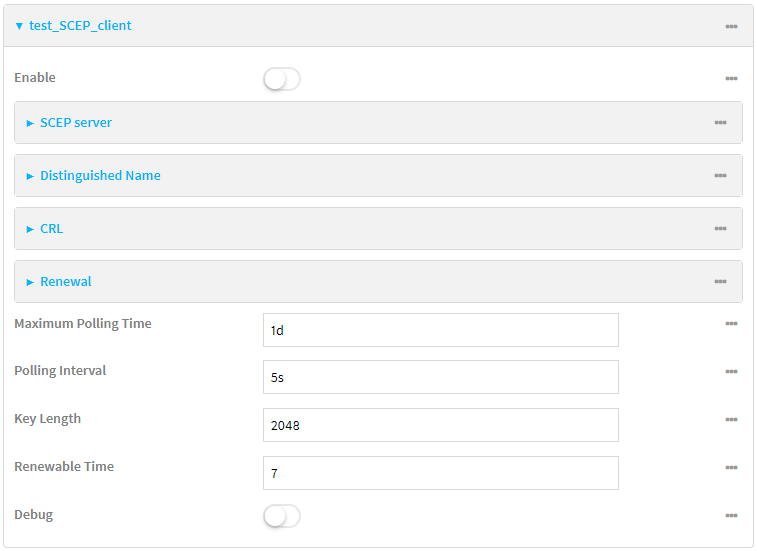
- Click Enable to enable the SCEP client.
- For Maximum Polling Time, type the maximum time that the device will poll the SCEP server, when operating in manual mode.
For example, to set Maximum Polling Time to ten minutes, enter 10m or 600s.
The default is 1d.
- For Polling Interval, type the amount of time that the device should wait between polling attempts, when operating in manual mode.
For example, to set Polling Interval to ten minutes, enter 10m or 600s.
The default is 5s.
- For Key Length, type the bit size of the private key. The default is 2048.
- For Renewable Time, type the number of days that the certificate enrollment can be renewed, prior to the request expiring. This value
- (Optional) Click Debug to enable verbose logging in /var/log/scep_client.
- Click to expand SCEP server.
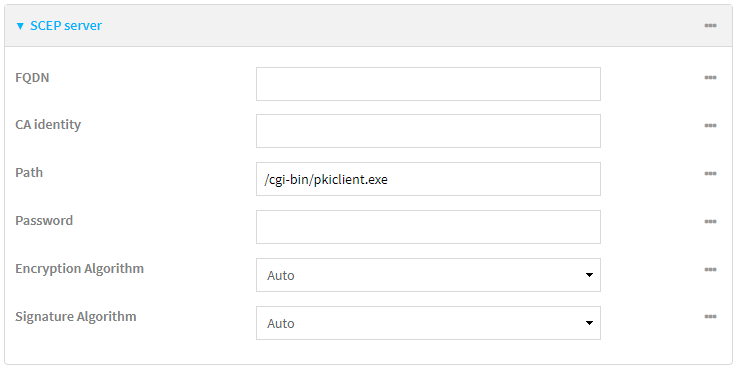
- For FQDN, type the fully qualified domain name or IP address of the
- (Optional) For CA identity, type a string that will be understood by the certificate authority. For example, it could be a domain name or a user name. If the certificate authority has multiple CA certificates, this field can be used to distinguish which is required.
- For Path, Type the HTTP URL path required for accessing the certificate authority. You should leave this option at the default of /cgi-bin/pkiclient.exe unless directed by the CA to use another path.
- For Password, type the challenge password
-
For Encryption Algorithm, select the PKCS#7 encryption algorithm. The default is Auto, which automatically selects the best algorithm.
-
For Signature Algorithm, select the PKCS#7 signature algorithm. The default is Auto, which automatically selects the best algorithm.
- Click to expand Distinguished Name.
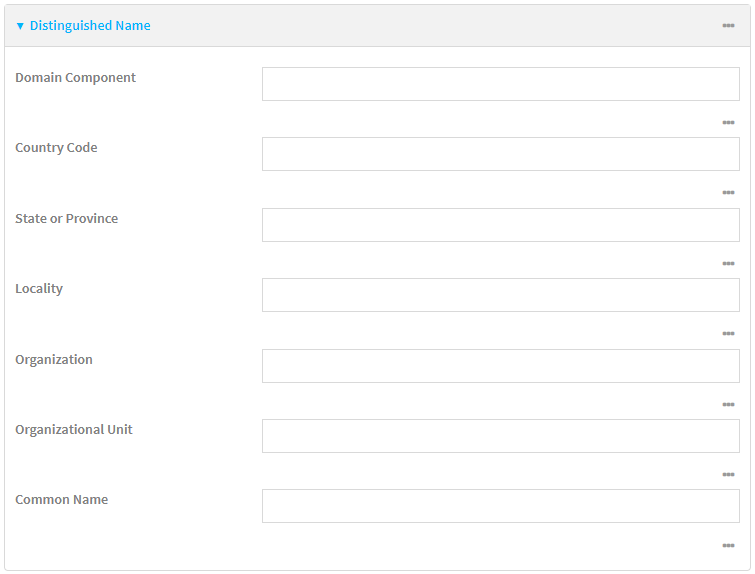
- Type the value for each appropriate Distinguished Name attribute.
- (Optional) Configure the certificate revocation list (CRL):
- Click to expand CRL.
- Click Enable to enable the CRL.
- For Type, select the type of CRL:
URL: The URL to the file name used to access the certificate revocation list from the CA.
CRLDP: The CRL distribution point.
getCRL: A CRL query using the issuer name and serial number from the certificate whose revocation status is being queried.
The default is URL.
If Type is set to URL, for URL, type the URL to be used.
-
Configure certificate renewal:
-
Click to expand Renewal.
-
Click Use New Private Key to enable the creation of a new private key for renewal requests.
-
Use Client Certificate is enabled by default. Click to disable the use of a client certificate for renewal requrests.
-
- Click Apply to save the configuration and apply the change.
CLI instructions
- Add a new SCEP client:
(config)> add network scep_client
- Enable the SCEP client:
(config network scep_client
- Set the url parameter to the fully qualified domain name or IP address of the SCEP server:
(config network scep_client
- (Optional) Set a CA identity string that will be understood by the certificate authority. For example, it could be a domain name or a user name. If the certificate authority has multiple CA certificates, this field can be used to distinguish which is required.
(config network scep_client scep_client_name)> server ca_ident string
(config network scep_client scep_client_name)>
- Set the HTTP URL path required for accessing the certificate authority. You should leave this option at the default of /cgi-bin/pkiclient.exe unless directed by the CA to use another path.
(config network scep_client scep_client_name)> server path path
(config network scep_client scep_client_name)>
- Set the challenge password as configured on the SCEP server
- Set Distinguished Name attributes
Set the Domain Component:
(config network scep_client
Set the two letter Country Code:
(config network scep_client
Set the State or Province:
(config network scep_client
Set the Locality:
(config network scep_client
Set the Organization:
(config network scep_client
Set the Organizational Unit:
(config network scep_client
Set the Common Name:
(config network scep_client
- (Optional) Configure the certificate revocation list (CRL):
- Enable the CRL:
(config network scep_client scep_client_name)> crl enable true
(config network scep_client scep_client_name)>
- Set the type of CRL:
(config network scep_client scep_client_name)> crl type value
(config network scep_client scep_client_name)>
where value is one of:
url: The URL to the file name used to access the certificate revocation list from the CA.
crldp: The CRL distribution point.
getCRL: A CRL query using the issuer name and serial number from the certificate whose revocation status is being queried.
The default is url.
- If type is set to url, set the URL that should be used:
(config network scep_client scep_client_name)> crl url value
(config network scep_client scep_client_name)>
- Enable the CRL:
-
Configure certificate renewal:
- To enable the creation of a new private key for renewal requests:
(config network scep_client scep_client_name)> renewal new_key true
(config network scep_client scep_client_name)>
-
The use of a client certificate for renewal requests is enabled by default. To disable:
(config network scep_client scep_client_name)> renewal use_client_cert false
(config network scep_client scep_client_name)>
- To enable the creation of a new private key for renewal requests:
- Set the maximum time that the device will poll the SCEP server, when operating in manual mode:
(config network scep_client scep_client_name)> max_poll_time value
(config network scep_client scep_client_name)>
For example, to set max_poll_time to ten minutes, enter either 10m or 600s:
(config network scep_client scep_client_name)> max_poll_time 600s
(config network scep_client scep_client_name)>
The default is 1d.
- Set the amount of time that the device should wait between polling attempts, when operating in manual mode:
(config network scep_client scep_client_name)> polling_interval value
(config network scep_client scep_client_name)>
For example, to set polling_interval to ten minutes, enter either 10m or 600s:
(config network scep_client scep_client_name)> polling_interval 600s
(config network scep_client scep_client_name)>
The default is 5s.
- Set the bit size of the private key:
(config network scep_client scep_client_name)> key_length int
(config network scep_client scep_client_name)>
The default is 2048.
-
Set the number of days that the certificate enrollment can be renewed, prior to the request expiring. This value
(config network scep_client
- (Optional) Enable verbose logging in /var/log/scep_client:
(config network scep_client
- Save the configuration and apply the change.
(config network scep_client scep_client_name)> save Configuration saved. > - Type exit to exit the Admin CLI.
Depending on your device configuration, you may be presented with an Access selection menu. Type quit to disconnect from the device.
(config network scep_client


