The WPA2
Using enterprise security modes allows each client to have different usernames and passwords configured in the RADIUS server, rather than using preshared key on the TX64 device.
Required configuration items
- Enable the Wi-Fi access point
- Select a Wi-Fi radio for the access point.
- The Service Set Identifier (SSID) for the access point.
- Configure security for the access point to WPA2 enterprise
Note Only select WPA3 Enterprise if you know that all Wi-Fi clients connecting to this device will have WPA3 capabilities.
- The IP address for one or more RADIUS servers.
- The secret key for one or more RADIUS servers.
- Wi-Fi access point assignment: Once you configure a Wi-Fi access point, you must assign the Wi-Fi access point.
- LAN interface: See Configure a Local Area Network (LAN).
- Bridge: See Configure a bridge.
Additional configuration items
- Determine whether to broadcast the access point's SSID.
- Determine whether to isolate clients connected to this access point, so that they cannot communicate with each other.
- The server port for one or more RADIUS server.
- The amount of time to wait before changing the group key.
To configure a Wi-Fi access point with WPA2 enterprise

Web
- Log into Digi Remote Manager, or log into the local Web UI as a user with full Admin access rights.
- Access the device configuration:
Remote Manager:
- Locate your device as described in Use Digi Remote Manager to view and manage your device.
- Click the Device ID.
- Click Settings.
- Click to expand Config.
Local Web UI:- On the menu, click System. Under Configuration, click Device Configuration.
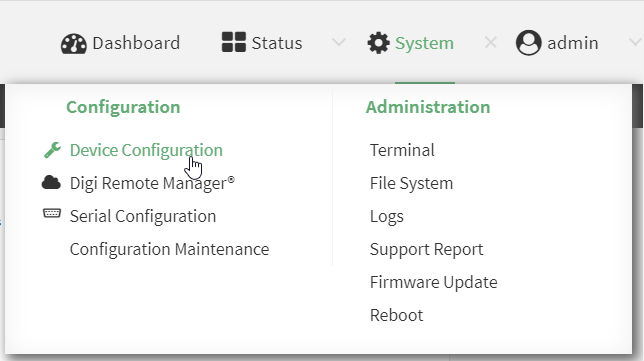
The Configuration window is displayed.
- Click Network > WiFi > Access points.
- Create a new access point or modify an existing access point:
- To create a new access point, for Add WiFi access point:, type a name for the access point and click .
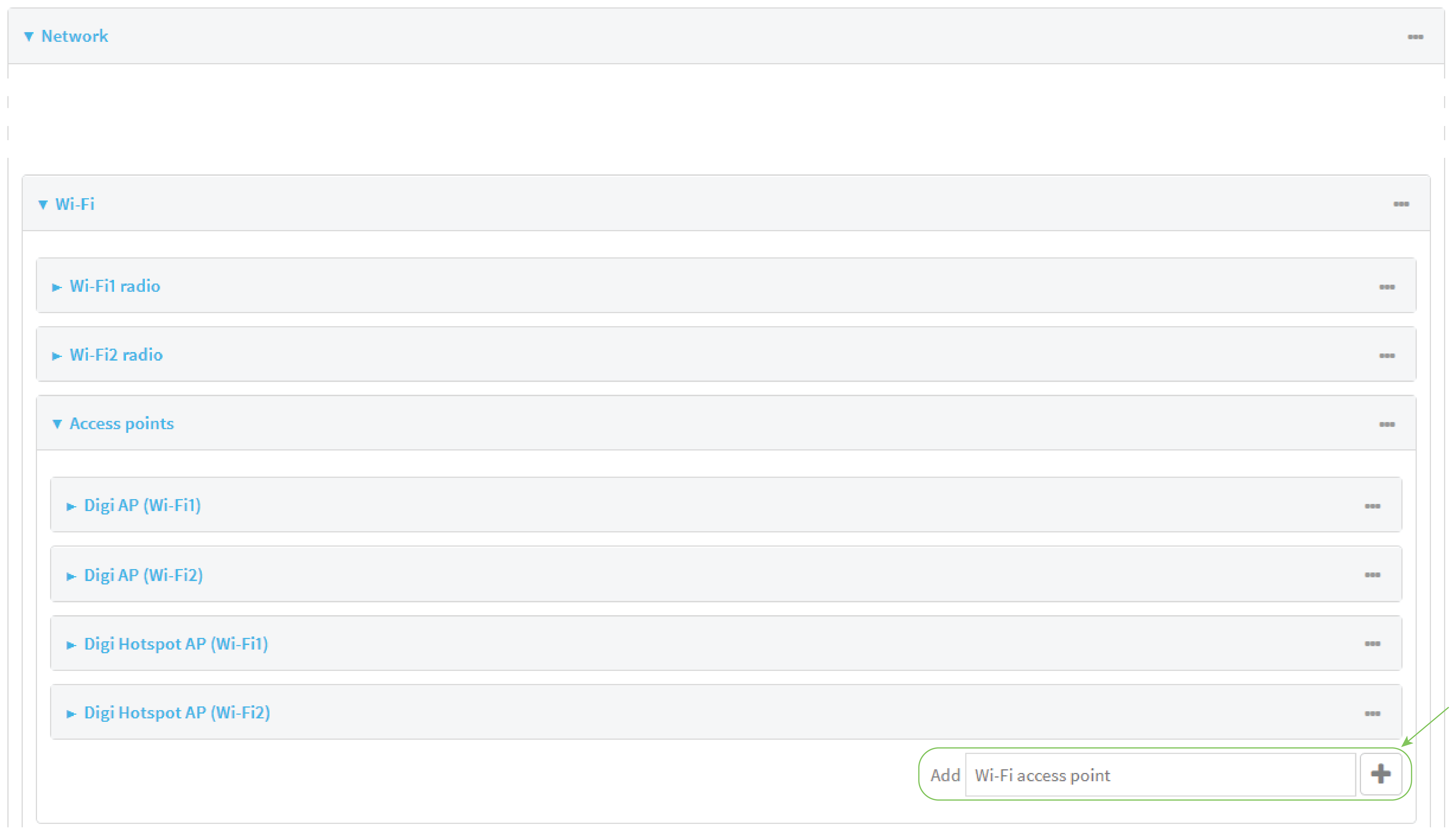
- To modify an existing access point, click to expand the access point.
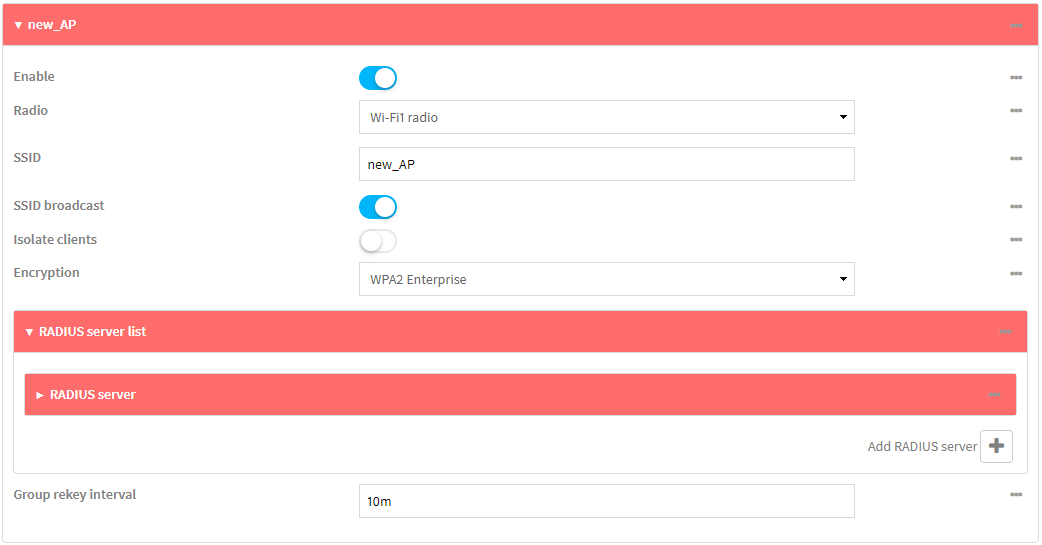
The Wi-Fi access point configuration window is displayed.
- To create a new access point, for Add WiFi access point:, type a name for the access point and click .
- For SSID, type the SSID. Up to 32 characters are allowed.
- Enable SSID broadcast to configure the radio to broadcast the SSID.
- (Optional) Enable Isolate clients if it isn't already enabled to prevent clients that are connected to this access point from communicating with each other. This setting is enabled by default. See Isolate Wi-Fi clients for information about how to prevent clients connected to different access points from communicating with each other.
- For Encryption, select either:
-
WPA2 Enterprise: Uses WPA2 enterprise security mode.
-
WPA3 Enterprise: Uses WPA3 enterprise security mode.
Note Only select WPA3 Enterprise if you know that all Wi-Fi clients connecting to this device will have WPA3 capabilities.
Note The DAL OS 25.11.10.42 release adds support for WPA3 Enterprise 192-bit mode and updates the default behavior for WPA3 Enterprise security settings.
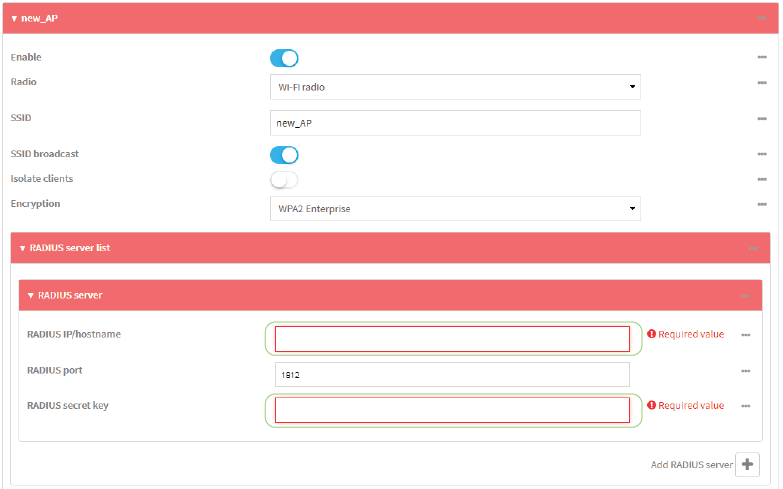
- Configure one or more RADIUS servers:
- Click to expand RADIUS server list.
- Click to expand RADIUS server.
- For RADIUS IP/hostname, type the IP address or hostname of the RADIUS server.
- (Optional) Change the RADIUS port. The default port is 1812.
- For RADIUS secret key, type the secret key as configured on the RADIUS server.
- To add additional RADIUS servers, click

-
(Optional) For Group rekey interval, type the amount of time to wait before changing the group key.
The group key is shared by all in clients of the access point, and after a client has disconnected, it will be able to use the group key to decrypt broadcast packets until the key is changed.
For example, to set Group rekey interval to ten minutes, enter 10m or 600s.
Increasing the time between rekeys can improve connectivity issues in noisy environments. To disable group rekeys, set to 0. This will allow any client that has previously connected to see all broadcast traffic on the wireless network until the Wi-Fi radio is restarted. The default is 10 minutes.
- Assign the Wi-Fi access point to a LAN interface
The access point must be assigned to an active LAN
- Click Apply to save the configuration and apply the change.
Command line
Configure a new access point
- Select the device in Remote Manager and click Actions > Open Console, or log into the TX64 local command line as a user with full Admin access rights.
Depending on your device configuration, you may be presented with an Access selection menu. Type admin to access the Admin CLI.
- At the command line, type config to enter configuration mode:
> config
(config)>
- Create a new access point:
(config)> add network wifi ap new_AP
(config network wifi ap new_AP)>
New access points are enabled by default.
- Set the Wi-Fi radio for the new access point:
- Show available radios:
(config network wifi ap new_AP)> radio ? Radio: The Wi-Fi radio to run this access point on. Format: wifi
- Set the appropriate radio:
(config network wifi ap new_AP)> radio wifi
- Show available radios:
- Set the SSID for the Wi-Fi access point. Up to 32 characters are allowed.
(config network wifi ap new_AP)> ssid my_SSID
(config network wifi ap new_AP)>
SSID broadcasting is enabled by default for new access points.
- Set the security for the access point to an enterprise security option:
(config network wifi ap new_AP)> encryption type value
(config network wifi ap new_AP)>
where value is either:
wpa2: Uses WPA2 enterprise security mode.
wpa3: Uses WPA3 enterprise security mode.
Note Only select wpa3 if you know that all Wi-Fi clients connecting to this device will have WPA3 capabilities.
Note The DAL OS 25.11.10.42 release adds support for WPA3 Enterprise 192-bit mode and updates the default behavior for WPA3 Enterprise security settings. To configure, navigate to the
- (Optional) Determine whether to prevent clients that are connected to this access point from communicating with each other:
(config)> network wifi ap digi_ap
See Isolate Wi-Fi clients for information about how to prevent clients connected to different access points from communicating with each other.
- Configure one or more RADIUS servers:
- Set the IP address of the RADIUS server:
(config network wifi ap new_AP)> encryption radius_servers 0 host IP_address
(config network wifi ap new_AP)>
- Set the secret key as configured on the RADIUS server:
(config network wifi ap new_AP)> encryption radius_servers 0 key secret_key
(config network wifi ap new_AP)>
- (Optional) Set the RADIUS server's port. The default is 1812.
(config network wifi ap new_AP)> encryption radius_servers 0 port port
(config network wifi ap new_AP)>
- (Optional) Add and configure additional radius servers:
Add a server:
(config network wifi ap new_AP)> add encryption radius_servers end
(config network wifi ap new_AP encryption radius_servers 1)>
Configure the new server as described above. For example, set the server IP address:
(config network wifi ap new_AP encryption radius_servers 1)> host IP_address
(config network wifi ap new_AP encryption radius_servers 1)>
- Repeat for additional radius servers.
- Set the IP address of the RADIUS server:
-
(Optional) Set the amount of time to wait before changing the group key.
The group key is shared by all in clients of the access point, and after a client has disconnected, it will be able to use the group key to decrypt broadcast packets until the key is changed.
(config network wifi ap new_AP)> encryption group_rekey value
(config network wifi ap new_AP)>
For example, to set group rekey interval to ten minutes, enter either 10m or 600s:
(config network wireless ap new_AP)> encryption group_rekey 600s
(config network wireless ap new_AP)>
Increasing the time between rekeys can improve connectivity issues in noisy environments. To disable group rekeys, set to 0. This will allow any client that has previously connected to see all broadcast traffic on the wireless network until the Wi-Fi radio is restarted. The default is 10 minutes.
- Assign the Wi-Fi access point to a LAN interface
The access point must be assigned to an active LAN
- Save the configuration and apply the change.
(config)> save Configuration saved. > - Type exit to exit the Admin CLI.
Depending on your device configuration, you may be presented with an Access selection menu. Type quit to disconnect from the device.
Note If WPA3 enterprise mode will be used for the encryption technology, you must set the radio to wifi2.
Edit an existing Access point
- Select the device in Remote Manager and click Actions > Open Console, or log into the TX64 local command line as a user with full Admin access rights.
Depending on your device configuration, you may be presented with an Access selection menu. Type admin to access the Admin CLI.
- At the command line, type config to enter configuration mode:
> config
(config)>
- Show available access points:
(config)> network wifi ap ? Additional Configuration ------------------------------------------------------------------------------- digi_ap
- Set the SSID for the appropriate access point:
(config)> network wifi ap digi_ap
- SSID broadcasting is enabled by default for the preconfigured access points. If SSID broadcasting is disabled:
(config)> network wifi ap digi_ap
- Set the security for the access point to an enterprise security option:
(config network wifi ap new_AP)> encryption type value
(config network wifi ap new_AP)>
where value is either:
wpa2: Uses WPA2 enterprise security mode.
wpa3: Uses WPA3 enterprise security mode.
Note Only select wpa3 if you know that all Wi-Fi clients connecting to this device will have WPA3 capabilities.
Note The DAL OS 25.11.10.42 release adds support for WPA3 Enterprise 192-bit mode and updates the default behavior for WPA3 Enterprise security settings. To configure, navigate to the
- (Optional) Determine whether to prevent clients that are connected to this access point from communicating with each other:
(config)> network wifi ap digi_ap
See Isolate Wi-Fi clients for information about how to prevent clients connected to different access points from communicating with each other.
- Set the IP address or hostname of the RADIUS server:
(config)> network wifi ap digi_ap
- Set the secret key as configured on the RADIUS server:
(config)> network wifi ap digi_ap
- (Optional) Set the RADIUS server's port. The default is 1812.
(config)> network wifi ap digi_ap
-
(Optional) Change the Wi-Fi radio for the access point
- Show available radios:
(config)> network wifi radio ?

 Additional Configuration
 -------------------------------------------------------------------------------
 wifi1                     Wi-Fi1 radio
 wifi2                     Wi-Fi2 radio

(config)>
- Set the appropriate radio:
(config)> network wifi ap digi_ap1 radio wifi1
(config)>
- Show available radios:
-
(Optional) Set the amount of time to wait before changing the group key.
The group key is shared by all in clients of the access point, and after a client has disconnected, it will be able to use the group key to decrypt broadcast packets until the key is changed.
(config)> network wifi ap digi_ap
For example, to set group rekey interval to ten minutes, enter either 10m or 600s:
(config)> network wireless ap digi_ap1 encryption group_rekey 600s
(config)>
Increasing the time between rekeys can improve connectivity issues in noisy environments. To disable group rekeys, set to 0. This will allow any client that has previously connected to see all broadcast traffic on the wireless network until the Wi-Fi radio is restarted. The default is 10 minutes.
- Assign the Wi-Fi access point to a LAN interface
The access point must be assigned to an active LAN
- Save the configuration and apply the change.
(config)> save Configuration saved. >- Type exit to exit the Admin CLI.
Depending on your device configuration, you may be presented with an Access selection menu. Type quit to disconnect from the device.
- Assign the Wi-Fi access point to a LAN interface


