Configure power button behavior
The TX54 device's front panel includes a Power button.
- If the device is off, pressing the Power button will turn on the device.
- If the device is on, the Power button includes two options to power down the device: short-press and long-press options. By default, both short-press and long-press Power button actions will shut down the device.
You can disable the short-press power down behavior, to prevent powering down the device when the Power button is accidentally pressed. You can also disable the power button entirely, so that both the short- and long-press power down behavior is disabled and the device cannot be powered down by using the Power button.
Web
- Log into Digi Remote Manager, or log into the local Web UI as a user with full Admin access rights.
- Access the device configuration:
 Remote Manager:
- Locate your device as described in Use Digi Remote Manager to view and manage your device.
- Click the Device ID.
- Click Settings.
- Click to expand Config.
Local Web UI:- On the menu, click System. Under Configuration, click Device Configuration.
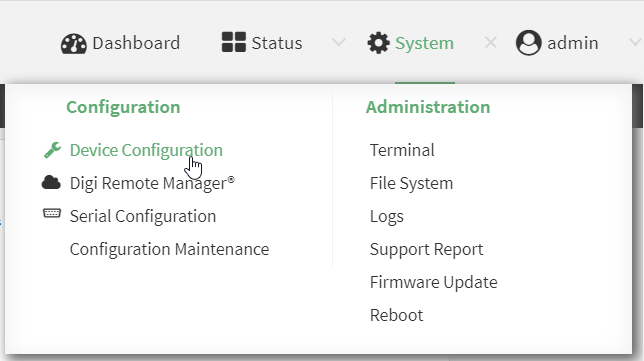
The Configuration window is displayed.
- Click System > Power.
- For Power button control, select one of the following options:
- Normal operation—The default behavior, in which both short-press and long-press Power button actions shut down the device.
- Graceful shutdown disabled—Disables the short-press behavior of the Power button. A long-press action will still shut down the device.
- Disabled—Disables the Power button entirely, so that neither the short- or long-press actions will shut down the device.
- Click Apply to save the configuration and apply the change.
Command line
- Select the device in Remote Manager and click Actions > Open Console, or log into the TX54 local command line as a user with full Admin access rights.
Depending on your device configuration, you may be presented with an Access selection menu. Type admin to access the Admin CLI.
- At the command line, type config to enter configuration mode:
> config
(config)>
- At the config prompt, type:
(config)> system power button value
where value is one of:
- normal—The default behavior, in which both short-press and long-press Power button actions shut down the device.
- forced_only—Disables the short-press behavior of the Power button. A long-press action will still shut down the device.
- disabled—Disables the Power button entirely, so that neither the short- or long-press actions will shut down the device.
- Save the configuration and apply the change.
(config)> save Configuration saved. > - Type exit to exit the Admin CLI.
Depending on your device configuration, you may be presented with an Access selection menu. Type quit to disconnect from the device.
 PDF
PDF


