Digi IX40 LEDs
|
Number |
Item |
Description |
|---|---|---|
|
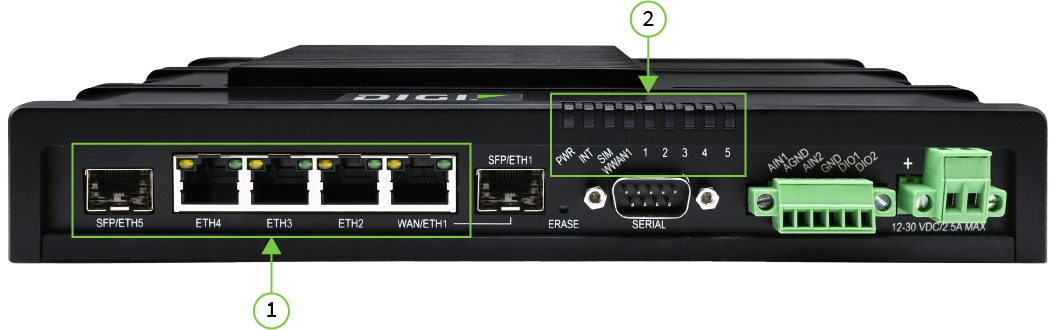
1 |
Ethernet Port LEDs |
The LEDs for each port indicate Ethernet link and activity. See Port LEDs. |
| 2 |
Status LEDs |
The Status LEDs are located on the top front panel. The number of LEDs varies by model. During bootup, these LEDs light up in sequence to indicate boot progress. See Status LEDs. |
Ethernet Port LEDs
The amber and green-colored LEDs indicate that the Ethernet network interface is up and there is activity.
|
Amber LEDs
|
|
Green LEDs
|
Status LED
|
PWR
|
Green LED. LED is on when there is power. |
||||||||||||||||||||||||||||||||||||
|
INT Interface connection. |
|
||||||||||||||||||||||||||||||||||||
|
SIM SIM card use and network connection confirmation. |
|
||||||||||||||||||||||||||||||||||||
|
WWAN1 Type of cellular network connection. |
|
||||||||||||||||||||||||||||||||||||
|
1 - 5 Signal quality. |
|
||||||||||||||||||||||||||||||||||||


