Configure Remote Access mode for a serial port
Remote Access mode allows for remote access to another device that is connected to the serial port. Remote Access mode exposes a serial port on a remote device as a standard COM/TTY port on a client computer.
To change the configuration to match the serial configuration of the device to which you want to connect:
-
Choose the management interface you want to use to access your device. Click a dropdown for instructions.
-
Configure the settings.
 Menu instructions
-
Click to open the device's configuration menu.
-
In Digi Remote Manager, on the device dashboard, click Settings.
-
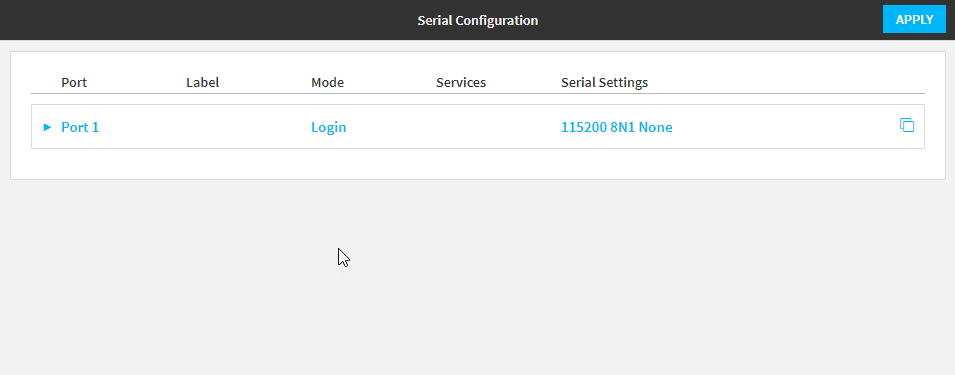
In the Web UI, click Serial Configuration or Device Configuration > Serial.
The Serial Configuration page is displayed.
-
- Click the name of the port that you want to configure.
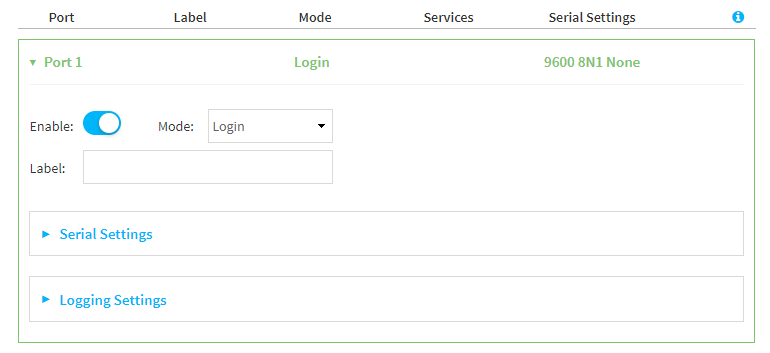
- For Serial mode, select Remote access (TCP).
-
(Optional) For Label, enter a label that will be used when referring to this port.
-
Expand Serial Settings.
The entries in the following fields must match the information for the power controller. Refer to your power controller manual for the correct entries.
-
Baud rate: For Baud rate, select the baud rate used by the device to which you want to connect. The default is 9600.
-
Data bits: For Data bits, select the number of data bits used by the device to which you want to connect. The default is 8.
-
Parity: For Parity, select the type of parity used by the device to which you want to connect. The default is None.
-
Stop bits: For Stop bits, select the number of stop bits used by the device to which you want to connect. The default is 1.
-
Flow control: For Flow control, select the type of flow control used by the device to which you want to connect. The default is None.
-
- Click to expand Data Framing.
- Click Enable to enable the data framing feature.
- For Maximum Frame Count, enter the maximum size of the packet. The default is 1024.
- For Idle Time, enter the length of time the device should wait before sending the packet.
- For End Pattern, enter the end pattern. The packet is sent when this pattern is received from the serial port.
- Click Strip End Pattern if you want to remove the end pattern from the packet before it is sent.
-
Expand Service Settings.
All service settings are disabled by default. Click available options to toggle them to enabled, and set the IP ports as appropriate.
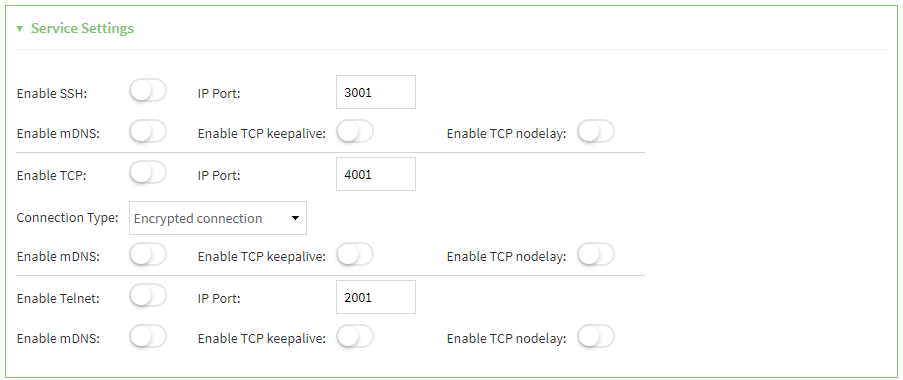
Note If the Telnet service is enabled for the serial port, note that the Telnet Login option, when enabled, prompts the user to enter Telnet login credentials when accessing the serial port via Telnet. The Telnet Login option is enabled by default. To disable this option, navigate to System > Device Configuration > Authentication > Serial and disable Telnet Login.
For each type of service, you can also configure the access control.
To do this, you need to go to Device Configuration:
- On the menu, click System. Under Configuration, click Device Configuration.
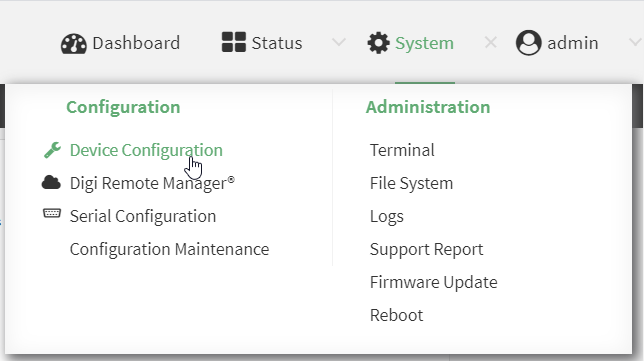
The Configuration window is displayed.
-
Access the configuration for the appropriate type of service:
-
Click to expand Serial.
-
Click to expand the appropriate serial port.
-
Click to expand the appropriate type of service.
-
Click to expand Access Control List.
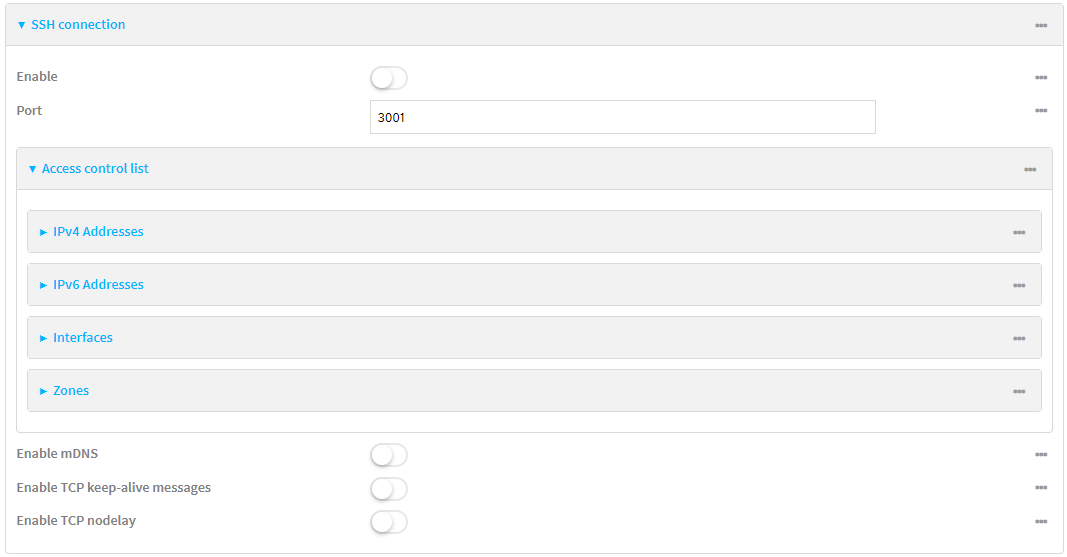
For example, to set the Access Control List for the SSH connection for serial port 1, click to expand Serial > Port 1 > SSH connection > Access Control List:
- To limit access to specified IPv4 addresses and networks:
- Click IPv4 Addresses.
- For Add Address, click .
- For Address, enter the IPv4 address or network that can access the device's service-type. Allowed values are:
- A single IP address or host name.
- A network designation in CIDR notation, for example, 192.168.1.0/24.
- any: No limit to IPv4 addresses that can access the service-type.
- Click again to list additional IP addresses or networks.
- To limit access to specified IPv6 addresses and networks:
- Click IPv6 Addresses.
- For Add Address, click .
- For Address, enter the IPv6 address or network that can access the device's service-type. Allowed values are:
- A single IP address or host name.
- A network designation in CIDR notation, for example, 2001:db8::/48.
- any: No limit to IPv6 addresses that can access the service-type.
- Click again to list additional IP addresses or networks.
- To limit access to hosts connected through a specified interface on the device:
- Click Interfaces.
- For Add Interface, click .
- For Interface, select the appropriate interface from the dropdown.
- Click again to allow access through additional interfaces.
- To limit access based on firewall zones:
- Click Zones. By default, there are three firewall zones already configured: Internal, Edge, and IPsec.
- For Add Zone, click .
- For Zone, select the appropriate firewall zone from the dropdown.
See Firewall configuration for information about firewall zones.
- Click again to allow access through additional firewall zones.
-
- On the menu, click System. Under Configuration, click Device Configuration.
-
Expand Autoconnect Settings. The autoconnect feature is used to initiate a connection to a remote server to directly access the serial port.
-
Click Enable to enable the autoconnect feature.
-
For Connection Trigger, select the option that describes the type of event that should trigger the connection.
If you select the Data received matches a string option, additional fields display.
-
In the Data Match String field, enter the received data string that should trigger the connection. The syntax is: backslash escaped string
-
The Flush String option determines whether the match string data sent from the remote server is discarded.
-
Enable: Discard the match string data. This is the default.
-
Disable: Do not discard the match string data.
-
-
-
For Outbound Connection Type, select the option that describes the method used to initiate the connection.
Note Additional autoconnect configuration options are available when you select the SSH connection option. These options can be configured in the CLI and in the web UI Configuration page.
-
For Destination, enter the host name or IP address of the remote server. When using SSH, this should be prefixed with the user name and followed by @, for example, admin@192.168.1.1.
-
For IP port, enter the TCP port of the remote server (1-65535).
-
Click Enable TCP keep-alive to enable TCP keepalive on the connection.
-
Click Enable TCP nodelay to enable TCP nodelay on the connection.
-
For Socket ID string, type text to be transmitted to the remote server when the socket connects.
-
-
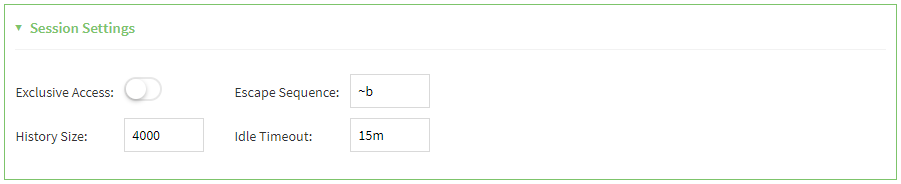
Expand Session Settings.
-
Enable Exclusive access to limit access to the serial port to a single active session. This option is disabled by default. When it is disabled, multiple users can connect using
-
For Escape sequence, type the characters used to start an escape sequence. If no characters are defined, the escape sequence is disabled. The default is ~b.
-
For History size, type or select the number of bytes of output from the serial port that are written to buffer. These bytes are redisplayed when a user connects to the serial port. The default is 4000 bytes.
-
For Idle timeout, type the amount of time to wait before disconnecting due to user inactivity.
-
-
Expand Monitor Settings.
-
Enable CTS to monitor CTS (Clear to Send) changes on this port.
-
Enable DCD to monitor DCD (Data Carrier Detect) changes on this port.
-
-
Expand Logging Settings to configure logging for this serial port.
-
To enable logging, click to toggle on Enable.
-
In the Log file name field, enter a descriptive name for the log file.
-
For Log file size, type the size of the log file. When the log file reaches the size limit, the current file is saved and a new file is created. The default is 65536 bytes.
-
Use the Enable remote logging option to enable serial data logging to remote servers. The serial data for the port is exported and sent to the remote server. The remote server configuration determines how the file is saved.
-
Disabled: Serial data logging to remote servers is not performed. This is the default.
-
Enabled: Serial data logging to remote servers is performed. The serial data for the port is exported and and sent to the remote server.
Note When this feature is enabled, you must also have a syslog server configured for the device, which ensures that the log can be saved. To add a syslog server, click the wrench icon next to the Enable remote logging option or navigate to Device Configuration > System > Log > Server List.
-
-
From the Type of data to log list box, specify the type of data that should be saved.
-
Received
-
Transmitted
-
Both
-
Both with arrows. This is the default.
-
-
If you want to log the time at which date was received or transmitted, click the Timestamps toggle to Enable.
-
If you want to log the data as hexadecimal values, click the Hexadecimal toggle to Enable.
Note You can review the message log in the Serial Port Log page. See Review the serial port message log.
-
- Click Apply to save the configuration and apply the change.
The serial port is enabled by default. To disable, toggle off Enable.
CLI instructions
-
At the CLI prompt, type config and then press Enter.
- Serial ports is enabled by default. To disable:
(config)> serial port_number enable false
(config)>
Command line examples in this section will use port1 for the serial port. However, any port number can be used.
- Set the mode:
(config)> serial port1 mode remoteaccess
(config)>
- (Optional) Set a label that will be used when referring to this port.
(config)>serial port1 label label
(config)>
- Set the baud rate used by the device to which you want to connect:
(config)> serial port1 baudrate rate
(config)>
- Set the number of data bits used by the device to which you want to connect:
(config)> serial port1 databits bits
(config)>
- Set the type of parity used by the device to which you want to connect:
(config)> serial port1 parity parity
(config)>
Allowed values are:
- even
- odd
- none
The default is none.
- Set the stop bits used by the device to which you want to connect:
(config)> serial port1 stopbits bits
(config)>
- Set the type of flow control used by the device to which you want to connect:
(config)> serial port1 flow value
(config)>
where value is one of:
none
rts/cts
xon/xoff
-
Configure the session settings.
- Set the characters used to start an escape sequence:
(config)>serial port1 escape string
(config)
If no characters are defined, the escape sequence is disabled. The default is ~b.
- Limit access to the serial port to a single active session:
(config)>serial port1 exclusive true
(config)
- Set the number of bytes of output from the serial port that are written to buffer. These bytes are redisplayed when a user connects to the serial port.
(config)>serial port1 history bytes
(config)
The default is 4000 bytes.
- Set the amount of time to wait before disconnecting due to user inactivity:
(config)>serial port1 idle_timeout value
(config)
where value is any number of weeks, days, hours, minutes, or seconds, and takes the format number{w|d|h|m|s}.
For example, to set idle_timeout to ten minutes, enter either 10m or 600s:
(config)>serial port1 idle_timeout 600s
(config)
The default is 15m.
- Set the characters used to start an escape sequence:
-
Configure monitor settings.
- (Optional) Enable monitoring of CTS (Clear to Send) changes on this port:
(config)>serial port1 monitor cts true
(config)
- (Optional) Enable monitoring of DCD (Data Carrier Detect) changes on this port:
(config)>serial port1 monitor dcd true
(config)
- (Optional) Enable monitoring of CTS (Clear to Send) changes on this port:
-
(Optional) Configure autoconnect:
-
Enable autoconnect:
(config)>serial port1 autoconnect enable true
(config)>
-
Set the option that will trigger the connection:
(config)>serial port1 autoconnect trigger value
(config)>
where value is one of:
- always
- data
- dcd
- destination
- dsr
- match
If match is selected:
Set the string that, when received, will trigger the connection:
(config)>serial port1 autoconnect match_string string
(config)>
flush_string is enabled by default, which will discard the matched string from data sent to the server. To disable:
(config)>serial port1 autoconnect flush_string false
(config)>
The default is always.
-
Set the option that initiates the connection:
(config)>serial port1 autoconnect conn_type value
(config)>
where value is one of:
- ssh
- tcp
- telnet
- tls
- tls_auth
The default is tls.
-
Set the host name or IP address of the destination server:
(config)>serial port1 autoconnect destination hostname/IP_address
(config)>
When using SSH, this should be prefixed with the user name and followed by @, for example:
(config)>serial port1 autoconnect destination admin@192.168.1.1
(config)>
-
Set the TCP port of the destination server:
(config)>serial port1 autoconnect port int
(config)>
where int is any integer between 1 and 65535.
-
To enable TCP keepalive:
(config)>serial port1 autoconnect keepalive true
(config)>
-
To enable TCP nodelay:
(config)>serial port1 autoconnect nodely true
(config)>
-
Set the text to be transmitted to the remote server when the socket connects
(config)>serial port1 socketid string
(config)>
-
Set the additional autoconnect options. These are available if you have set the serial port1 autoconnect conn_type option to ssh.
-
Set the variable that determines from where the user name used for the connection should be read.
(config)>serial port1 autoconnect username_source value
(config)>
where value is one of the following:
-
config: Define the user name. When you choose this option, you must also configure the static user name.
(config)>serial port1 autoconnect username string
(config)>
where string is the static user name
-
prompt: The user is prompted to enter their user name when the trigger connection condition is met. This is the default.
-
-
Set the variable that determines whether you want to run in a mode more suitable for an interactive user session.
(config)>serial port1 autoconnect interactive true|false
(config)>
Set this to true to run the allocated pseudo-terminal in canonical mode, enable escape sequences, and output notifications from the ssh process. This is the default.
-
Set the value of the TERM environment variable that is sent to the remove server. The default is vt100.
(config)>serial port1 autoconnect terminal string
(config)>
-
-
-
(Optional) Configure data framing:
- Enable data framing:
(config)>serial port1 framing enable true
(config)
- Set the maximum size of the packet:
(config)>serial port1 framing max_count int
(config)
The default is 1024.
- Set the length of time the device should wait before sending the packet:
(config)>serial port1 framing idle_time value
(config)
where value is in milliseconds (ms) or seconds (s). The maximum value is 60s.
- Set the end pattern. The packet is sent when this pattern is received from the serial port:
(config)>serial port1 framing end_pattern backslash-escaped-string
(config)
- Set the strip end pattern if you want to remove the end pattern from the packet before it is sent:
(config)>serial port1 framing strip_pattern true
(config)
- Enable data framing:
-
(Optional) Configure service settings:
-
Configure SSH settings:
-
Enable SSH:
(config)>serial port1 service ssh enable true
(config)>
-
Set the port to be used for ssh communications:
(config)>serial port1 service ssh port int
(config)>
where int is any integer between 1 and 65535. The default is 3001.
-
Enable TCP keep-alive messages:
(config)>serial port1 service ssh keepalive true
(config)>
-
Enable TCP nodelay messages:
(config)>serial port1 service ssh nodelay true
(config)>
-
(Optional) Configure access control:
- To limit access to specified IPv4 addresses and networks:
(config)> add serial port1 service ssh acl address end value
(config)>
Where value can be:
- A single IP address or host name.
- A network designation in CIDR notation, for example, 192.168.1.0/24.
- any: No limit to IPv4 addresses that can access the service-type.
Repeat this step to list additional IP addresses or networks.
- To limit access to specified IPv6 addresses and networks:
(config)> add serial port1 service ssh acl address6 end value
(config)>
Where value can be:
- A single IP address or host name.
- A network designation in CIDR notation, for example, 2001:db8::/48.
- any: No limit to IPv6 addresses that can access the service-type.
Repeat this step to list additional IP addresses or networks.
- To limit access to hosts connected through a specified interface on the IX20 device:
(config)> add serial port1 service ssh acl interface end value
(config)>
Where value is an interface defined on your device.
Display a list of available interfaces:Use ... network interface ? to display interface information:
(config)> ... network interface ?

Interfaces

Additional Configuration
-------------------------------------------
 setupip              Setup IP
 setuplinklocalip       Setup Link-local IP
 eth1                   ETH1
 eth2                   ETH2
 loopback               Loopback
 modem                  Modem

(config)>
Repeat this step to list additional interfaces.
- To limit access based on firewall zones:
(config)> add serial port1 service ssh acl zone end value
(config)>
Where value is a firewall zone defined on your device, or the any keyword.
Display a list of available firewall zones:Type ... firewall zone ? at the config prompt:
(config)> ... firewall zone ? Zones: A list of groups of network interfaces that can be referred to by packet filtering rules and access control lists. Additional Configuration ------------------------------------------------------------------------------- any dynamic_routes edge external
Repeat this step to include additional firewall zones.
- To limit access to specified IPv4 addresses and networks:
-
(Optional) Enable Multicast DNS (mDNS):
(config)>serial port1 service ssh mdns enable true
(config)>
-
-
Configure TCP settings:
-
Enable TCP:
(config)>serial port1 service tcp enable true
(config)>
-
Set the port to be used for ssh communications:
(config)>serial port1 service tcp port int
(config)>
where int is any integer between 1 and 65535. The default is 4001.
-
Enable TCP keep-alive messages:
(config)>serial port1 service tcp keepalive true
(config)>
-
Set the option that initiates the connection:
(config)>serial port1 service tcp conn_type value
(config)>
where value is one of:
- tcp
- tls
- tls_auth
The default is tls.
-
Enable TCP nodelay messages:
(config)>serial port1 service tcp nodelay true
(config)>
-
(Optional) Configure access control:
- To limit access to specified IPv4 addresses and networks:
(config)> add serial port1 service tcp acl address end value
(config)>
Where value can be:
- A single IP address or host name.
- A network designation in CIDR notation, for example, 192.168.1.0/24.
- any: No limit to IPv4 addresses that can access the service-type.
Repeat this step to list additional IP addresses or networks.
- To limit access to specified IPv6 addresses and networks:
(config)> add serial port1 service tcp acl address6 end value
(config)>
Where value can be:
- A single IP address or host name.
- A network designation in CIDR notation, for example, 2001:db8::/48.
- any: No limit to IPv6 addresses that can access the service-type.
Repeat this step to list additional IP addresses or networks.
- To limit access to hosts connected through a specified interface on the IX20 device:
(config)> add serial port1 service tcp acl interface end value
(config)>
Where value is an interface defined on your device.
Display a list of available interfaces:Use ... network interface ? to display interface information:
(config)> ... network interface ?

Interfaces

Additional Configuration
-------------------------------------------
 setupip              Setup IP
 setuplinklocalip       Setup Link-local IP
 eth1                   ETH1
 eth2                   ETH2
 loopback               Loopback
 modem                  Modem

(config)>
Repeat this step to list additional interfaces.
- To limit access based on firewall zones:
(config)> add serial port1 service tcp acl zone end value
(config)>
Where value is a firewall zone defined on your device, or the any keyword.
Display a list of available firewall zones:Type ... firewall zone ? at the config prompt:
(config)> ... firewall zone ? Zones: A list of groups of network interfaces that can be referred to by packet filtering rules and access control lists. Additional Configuration ------------------------------------------------------------------------------- any dynamic_routes edge external
Repeat this step to include additional firewall zones.
- To limit access to specified IPv4 addresses and networks:
-
(Optional) Enable Multicast DNS (mDNS):
(config)>serial port1 service tcp mdns enable true
(config)>
-
-
Configure telnet settings:
-
Enable Telnet:
(config)>serial port1 service telnet enable true
(config)>
-
Set the port to be used for Telnet communications:
(config)>serial port1 service telnet port int
(config)>
where int is any integer between 1 and 65535. The default is 3001.
-
Enable TCP keep-alive messages:
(config)>serial port1 service telnet keepalive true
(config)>
-
Enable TCP nodelay messages:
(config)>serial port1 service telnet nodelay true
(config)>
-
(Optional) Configure access control:
- To limit access to specified IPv4 addresses and networks:
(config)> add serial port1 service telnet acl address end value
(config)>
Where value can be:
- A single IP address or host name.
- A network designation in CIDR notation, for example, 192.168.1.0/24.
- any: No limit to IPv4 addresses that can access the service-type.
Repeat this step to list additional IP addresses or networks.
- To limit access to specified IPv6 addresses and networks:
(config)> add serial port1 service telnet acl address6 end value
(config)>
Where value can be:
- A single IP address or host name.
- A network designation in CIDR notation, for example, 2001:db8::/48.
- any: No limit to IPv6 addresses that can access the service-type.
Repeat this step to list additional IP addresses or networks.
- To limit access to hosts connected through a specified interface on the IX20 device:
(config)> add serial port1 service telnet acl interface end value
(config)>
Where value is an interface defined on your device.
Display a list of available interfaces:Use ... network interface ? to display interface information:
(config)> ... network interface ?

Interfaces

Additional Configuration
-------------------------------------------
 setupip              Setup IP
 setuplinklocalip       Setup Link-local IP
 eth1                   ETH1
 eth2                   ETH2
 loopback               Loopback
 modem                  Modem

(config)>
Repeat this step to list additional interfaces.
- To limit access based on firewall zones:
(config)> add serial port1 service telnet acl zone end value
(config)>
Where value is a firewall zone defined on your device, or the any keyword.
Display a list of available firewall zones:Type ... firewall zone ? at the config prompt:
(config)> ... firewall zone ? Zones: A list of groups of network interfaces that can be referred to by packet filtering rules and access control lists. Additional Configuration ------------------------------------------------------------------------------- any dynamic_routes edge external
Repeat this step to include additional firewall zones.
- To limit access to specified IPv4 addresses and networks:
-
(Optional) Enable Multicast DNS (mDNS):
(config)>serial port1 service telnet mdns enable true
(config)>
-
-
- Configure serial port logging:
- Enable serial port logging:
(config)>serial port1 logging enable true
(config)>
Set the file name:
(config)>serial port1 logging filename string
(config)>
Set the maximum allowed log size for the serial port log when starting the log:
(config)>serial port1 logging size value
(config)>
where value is the size of the log file in bytes. The default is 65536.
Specify whether you want to enable serial data logging to remote servers. The serial data for the port is exported and and sent to the remote server.
(config)>serial port1 logging enable remote value
(config)>
where value is one of:
false: Do not enable serial data logging to remote servers. This is the default.
no: Do not enable serial data logging to remote servers.
0: Do not enable serial data logging to remote servers.
true: Enable serial data logging to remote servers.
yes: Enable serial data logging to remote servers.
1: Enable serial data logging to remote servers.
Note When this feature is enabled, you must also have a syslog server configured for the device, which ensures that the log can be saved.
Specify the data type:
(config)>serial port1 logging type value
(config)>
where value is one of:
received
transmitted
both
arrows. This is the default.
Log the time at which date was received or transmitted:
(config)>serial port1 logging hex true
(config)>
Log data as hexadecimal values:
(config)>serial port1 logging timestamp true
(config)>
- Enable serial port logging:
- Save the configuration and apply the change.
(config)> save Configuration saved. > - Type exit to exit the Admin CLI.
Depending on your device configuration, you may be presented with an Access selection menu. Type quit to disconnect from the device.
-


