Configure Login mode for a serial port
Login mode allows you to connect your PC to the port and to log into the CLI.
Using the appropriate cable for your device, connect the cable to your device and then to a serial port that is configured for Login mode. You can then use a terminal emulator program on your PC to establish the serial connection and log into the CLI.
To change the configuration to match the serial configuration of the device to which you want to connect:

Web
-
Log into the EX15 WebUI as a user with full Admin access rights.
- On the menu, click System. Under Configuration, click Serial Configuration.
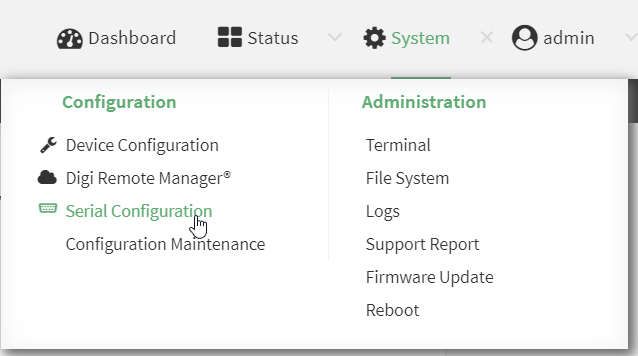
The Serial Configuration page is displayed.
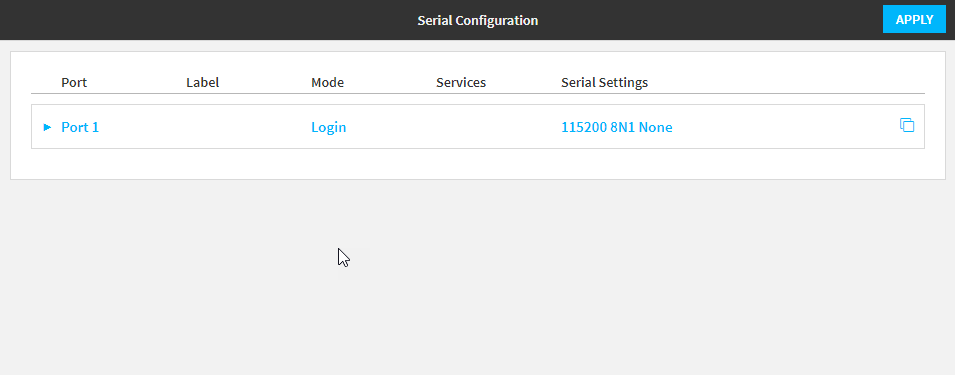
Note You can also configure the serial port by using Device Configuration > Serial. Changes made by using either Device Configuration or Serial Configuration will be reflected in both.
- Click the name of the port that you want to configure.
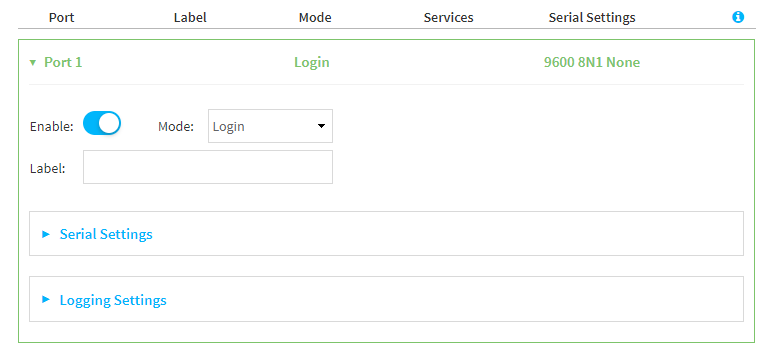
- For Mode, select Login.
-
(Optional) For Label, enter a label that will be used when referring to this port.
-
Expand Serial Settings.
The entries in the following fields must match the information for the power controller. Refer to your power controller manual for the correct entries.
-
Baud rate: For Baud rate, select the baud rate used by the device to which you want to connect. The default is 9600.
-
Data bits: For Data bits, select the number of data bits used by the device to which you want to connect. The default is 8.
-
Parity: For Parity, select the type of parity used by the device to which you want to connect. The default is None.
-
Stop bits: For Stop bits, select the number of stop bits used by the device to which you want to connect. The default is 1.
-
Flow control: For Flow control, select the type of flow control used by the device to which you want to connect. The default is None.
-
-
Expand Logging Settings to configure logging for this serial port.
-
To enable logging, click to toggle on Enable.
-
In the Log file name field, enter a descriptive name for the log file.
-
For Log file size, type the size of the log file. When the log file reaches the size limit, the current file is saved and a new file is created. The default is 65536 bytes.
-
From the Type of data to log list box, specify the type of data that should be saved.
-
Received
-
Transmitted
-
Both
-
Both with arrows. This is the default.
-
-
If you want to log the time at which date was received or transmitted, click the Timestamps toggle to Enable.
-
If you want to log the data as hexadecimal values, click the Hexadecimal toggle to Enable.
Note You can review the message log in the Serial Port Log page. See Review the serial port message log.
-
- Click Apply to save the configuration and apply the change.
The serial port is enabled by default. To disable, toggle off Enable.
Command line
- Select the device in Remote Manager and click Actions > Open Console, or log into the EX15 local command line as a user with full Admin access rights.
Depending on your device configuration, you may be presented with an Access selection menu. Type admin to access the Admin CLI.
- At the command line, type config to enter configuration mode:
> config
(config)>
- The serial port is enabled by default. To disable:
(config)> serial port1 enable false
(config)>
- Set the mode:
(config)> serial port1 mode login
(config)>
- (Optional) Set a label that will be used when referring to this port.
(config)>path-paramlabel label
(config)>
- Set the baud rate used by the device to which you want to connect:
(config)> serial port1 baudrate rate
(config)>
- Set the number of data bits used by the device to which you want to connect:
(config)> serial port1 databits bits
(config)>
- Set the type of parity used by the device to which you want to connect:
(config)> serial port1 parity parity
(config)>
Allowed values are:
- even
- odd
- none
The default is none.
- Set the stop bits used by the device to which you want to connect:
(config)> serial port1 stopbits bits
(config)>
- Set the type of flow control used by the device to which you want to connect:
(config)> serial port1 flow value
(config)>
where value is one of:
none
rts/cts
xon/xoff
- Configure serial port logging:
- Enable serial port logging:
(config)>serial port1 logging enable true
(config)>
Set the file name:
(config)>serial port1 logging filename string
(config)>
Set the maximum allowed log size for the serial port log when starting the log:
(config)>serial port1 logging size value
(config)>
where value is the size of the log file in bytes. The default is 65536.
Specify the data type:
(config)>serial port1 logging type value
(config)>
where value is one of:
received
transmitted
both
arrows. This is the default.
Log the time at which date was received or transmitted:
(config)>serial port1 logging hex true
(config)>
Log data as hexadecimal values:
(config)>serial port1 logging timestamp true
(config)>
- Enable serial port logging:
- Save the configuration and apply the change.
(config)> save Configuration saved. > - Type exit to exit the Admin CLI.
Depending on your device configuration, you may be presented with an Access selection menu. Type quit to disconnect from the device.


